
Skip to content
LearnDash Support
  • Products

      LearnDash LMS Plugin

      Powering intuitive online courses with advanced management and engagement features for WordPress.

      Learn More

      LearnDash LMS Plugin + Hosting

      StellarSites Learning is a fully managed hosting solution for WordPress.

      Learn More

      Premium LMS Add-ons
      Enhance your courses with extra features. Gather insights, reward learners, protect your course content, and more!

      Explore all Add-ons

      MemberDash
      The most flexible membership plugin for WordPress. Monetize your content and build a community.

      View MemberDash

  • Pricing
  • Add-ons & Integrations

      LEARNDASH ADD-ONS

      Instructor Role

      Empower Instructor to manage courses.

      Groups Management

      Organization management, delegation and more

      ProPanel

      Advanced analytics reporting.

      Gradebook

      Track progress and create report cards.

      Notes

      Enable notetaking and two-way communication.

      Rating, Reviews, & Feedback

      Build trust and gain valuable insights.

      FEATURED INTEGRATIONS

      The Events Calendar

      Connect with the most popular events solution.

      BuddyBoss

      Powerful tools for an enhance learning experience.

      WooCommerce

      The most popular shopping cart on WordPress.

      WeGlot

      Translate your LearnDash content.

      All Integrations

      BUNDLES

      Package and save
      Save when you buy multiple plugins in a bundle.

      See all bundles.

      MORE

      Release Notes

      Get Help

  • Resources
      LearnDash Academy Videos, webinars, and resources to help you launch a successful course.
      Blog Blog
articles with the latest news and tips to help you run high-quality courses.
      Knowledge Base A support network to help you make the most of your courses.
      Release Notes Stay up-to-date with the latest updates to LearnDash.
      Get Help

      Professional Services

      LMS Site Development Get hands-on assistance launching your course website.
      Website Maintenance WordPress management made easy.
      SEO Services SEO solutions that accelerate growth.

      Other Resources

      LearnDash Accessibility At LearnDash, we believe online learning should be accessible to everyone.
      Join the Dev Club
  • Demo
  • Sign In
Get LearnDash

Knowledge Bases: Support Home | LearnDash Core | LearnDash Add-ons | LearnDash Cloud | Resources | Mobile App

LearnDash Support
  • ← Return to LearnDash
  • Support
    • Support Home
    • All Knowledge Bases
    • LearnDash Core
    • Add-ons
    • Resources
    • Cloud
  • My Account
Popular searches: api duplicate couse email gp query loop [ld_course_resume]

ProPanel

1
  • ProPanel

Instructor Role

34
  • Intro to Instructor Role
  • Instructor Overview Page
  • Instructor Dashboard
  • Instructor Dashboard Menu
  • Adding Instructors
  • Multiple Instructors
  • Instructor Commissions
  • Selling Courses Through WooCommerce
  • Instructor Profile
  • Profile Introduction Sections
  • Create Learning Content And Quizzes
  • Instructor Role Reports
  • Instructor Notifications
  • Instructor Role Email Settings
  • Review Instructor Course Updates
  • Instructor Groups Access
  • Instructor Comments Access
  • Student Teacher Communication
  • Multiple Instructors Shortcode
  • Instructor Dashboard Settings
  • Instructor Role Color Schemes
  • Commission Logs
  • Instructor Role Navigation Settings
  • Instructor Role Overview Settings
  • Instructor Role Menu Settings
  • Frontend Course Creator
  • Frontend Quiz Creator
  • Frontend Dashboard: Installation Guide
  • Frontend Dashboard for Instructors: Gutenberg Blocks List
  • How to Customize the Frontend Dashboard
  • How to disable the WordPress admin page for Instructors
  • Introducing Frontend Dashboard
  • Elementor Compatibility
  • Setup PayPal Payouts for Instructors

Ratings, Reviews, & Feedback

1
  • Ratings, Reviews, & Feedback

Elementor Add-on

1
  • LearnDash Elementor Addon

Groups Plus

6
  • Group Leader
  • Create an Organization
  • Getting Started with Groups Plus
  • WooCommerce LearnDash Teams Products
  • Front-end Dashboard
  • Groups Plus FAQ

2Checkout Add-on

1
  • 2Checkout Integration

bbPress Add-on

1
  • bbPress Integration

Easy Digital Downloads Add-on

1
  • Easy Digital Downloads Integration

Event Espresso Add-on

1
  • Event Espresso Integration

Gravity Forms Add-on

1
  • Gravity Forms Integration

MemberPress Add-on

1
  • MemberPress Integration

Notifications Add-on

1
  • Notifications Add-On

Paid Memberships Pro Add-on

1
  • Paid Memberships Pro Integration

Restrict Content Pro Add-on

1
  • Restrict Content Pro Integration

SamCart Add-on

1
  • SamCart Integration

Stripe Add-on

1
  • Stripe Add-on Deprecation FAQ

The Events Calendar Add-on

1
  • The Events Calendar Integration

ThriveCart Add-on

1
  • ThriveCart Integration

WooCommerce Add-on

1
  • WooCommerce Integration

Zapier Add-on

1
  • Zapier Integration

Compatibility Add-on

1
  • Compatibility Add-Ons

Certificate Builder Add-on

1
  • Certificate Builder Add-On

Achievements Add-on

1
  • Achievements Add-On

Integrity Add-on

1
  • Integrity Add-on

3rd Party Plugins

1
  • 3rd Party Plugins

Gradebook

1
  • Gradebook Add-On

Notes Add-on

1
  • Notes Add-On

Groups Management

4
  • Groups Management
  • Global Settings
  • Groups Plus Add-On
  • Group Registration for LearnDash
View Categories
  • Home
  • All Knowledge Bases
  • Add-ons
  • Instructor Role
  • Selling Courses Through WooCommerce

Selling Courses Through WooCommerce

Instructors can now create and sell their own courses directly through your site using WooCommerce. By connecting LearnDash with WooCommerce, each course becomes a sellable product—giving instructors the opportunity to earn commissions from their sales.

To enable this functionality, make sure the following plugins are installed and activated.

1. WooCommerce 3.0.x
2.LearnDash WooCommerce Integration

How to Create a WooCommerce Product in The Instructor Dashboard #

  1. From the Instructor Dashboard, go to Products Add New
  2. Enter the Product Title and the Pricing details
  3. Do not forget to add a Course
  4. Once all the information has been added and you are ready to make the product live, click Publish
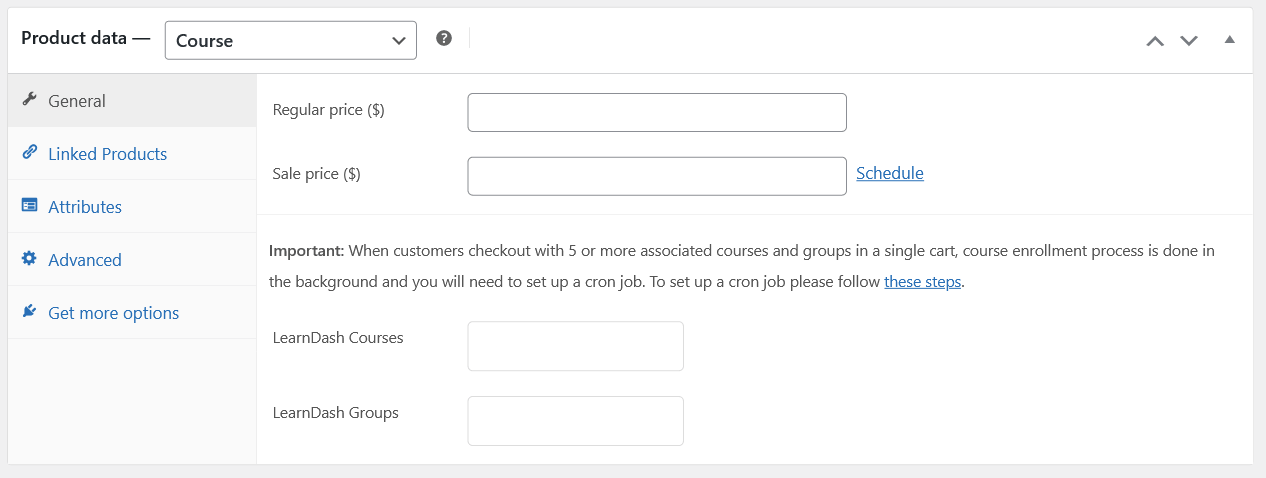
Sell Courses via WooCommerce

Set up Paypal Payouts for Instructors #

With PayPal Payouts, site owners can send instructor commissions directly and instantly from their website. This automated process is available through the Instructor Role plugin, once the proper setup is complete.

Before enabling this feature, a few prerequisites must be in place. This article outlines what’s needed to successfully set up PayPal Payouts for instructor commissions.

Important: PayPal Payouts only works with a PayPal Business account, and the Payouts feature must be activated by PayPal.

Prerequisites for using PayPal Payouts #

To use PayPal Payouts, you will need to have the following:

  • A PayPal business account: You can sign up for a PayPal business account at https://www.paypal.com/us/webapps/mpp/merchant
  • Access to PayPal Payouts: You can request access by visiting: https://www.paypal.com/payoutsweb/landing
  • A confirmed identity, email, and bank account linked to your PayPal business account: You must confirm your identity, email, and bank account linked to your PayPal business account before you can use PayPal Payouts
  • Sufficient funds in your PayPal business account: You must have sufficient funds in your PayPal business account

How to request access to PayPal Payouts #

  1. Visit the PayPal Payouts landing page at https://www.paypal.com/payoutsweb/landing
  2. Click on the Get Started button
  3. Provide information about your business needs to ensure the solution is a good fit for you
  4. Submit your application

PayPal will review your application and email you with a decision. In the meantime, you can set up and test your integration in your sandbox accounts.

Activating Payouts #

Activating PayPal Payouts is an essential step in the setup process. Without activation, the payouts feature will not function, regardless of other settings.

Due to recent updates in PayPal’s terms and conditions, activation is now managed directly by PayPal. If payouts are not yet enabled on the PayPal Business account, site owners must contact PayPal Support to request access.

Reach out to PayPal early in the setup process to avoid delays in enabling Instructor payments.

To activate payouts, follow these steps:

  1. Log in to your PayPal business account
  2. Click on Settings in the top right corner
  3. Click on Payment settings from the dropdown menu
  4. Click on Manage payouts in the Payouts section
  5. Follow the instructions to activate payouts

Once all prerequisites are in place, site owners can begin using PayPal Payouts to pay instructors through the Instructor Role plugin.

Creating a new API Application #

You will be using PayPals Payouts API to send money to your instructors. First, create an API Application. Log in to PayPal using your credentials and then visit My Apps in the PayPal Developer portal to create a new API Application.

You do not need to be a developer to create the application, you just need a set of credentials that will help the plugin send payment requests to PayPal on your behalf. When you visit the My Apps and Credentials screen you will see the following screen:
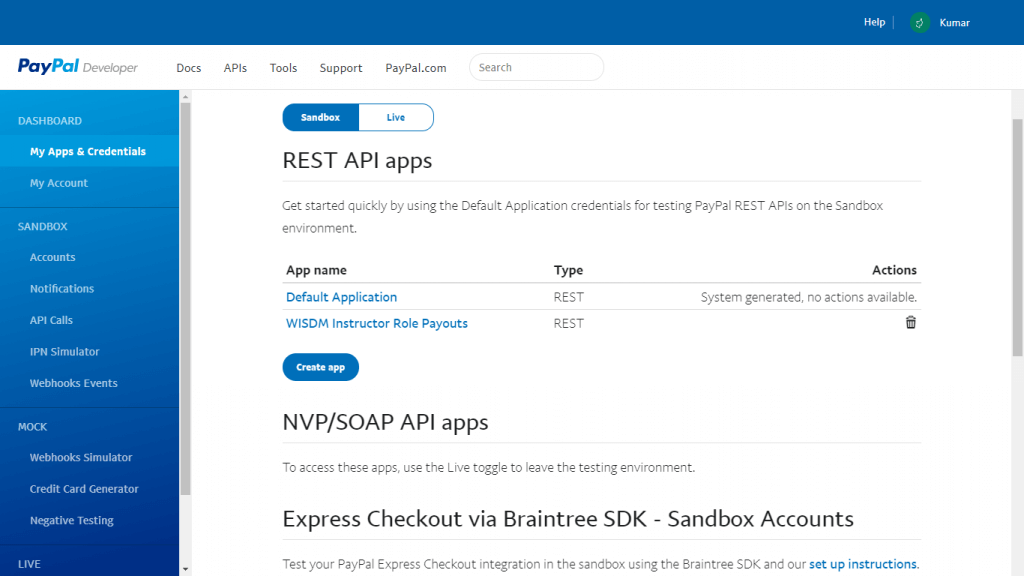
PayPal My Apps
PayPal My Apps

Click on Create App under the REST API apps section to create a new app. You can start with a Sandbox account to test how the application works.
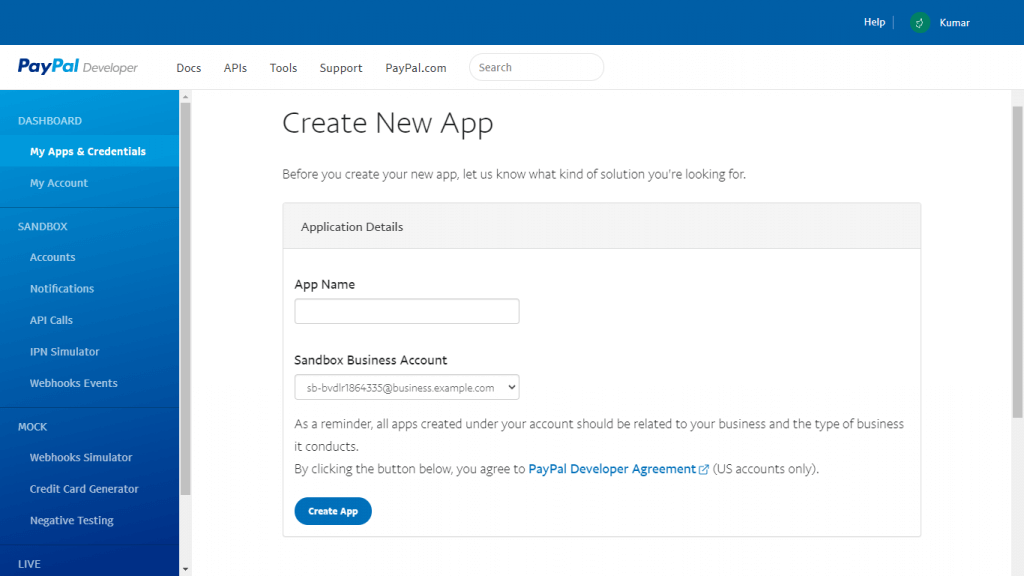
Create a New App
Create a New App

Enter Instructor Role Payouts as the App name and either keep the default sandbox account selected or select another one if you have and then click on Create App. Once you have created the App you can click on its name anytime to view its details.

When you are done with your sandbox testing, you can follow the same procedure for creating a live API application. Toggle to Live instead of Sandbox in the first step. Then, you will need to enable Live Payouts permission from the My Account page on your PayPal Developer Dashboard.
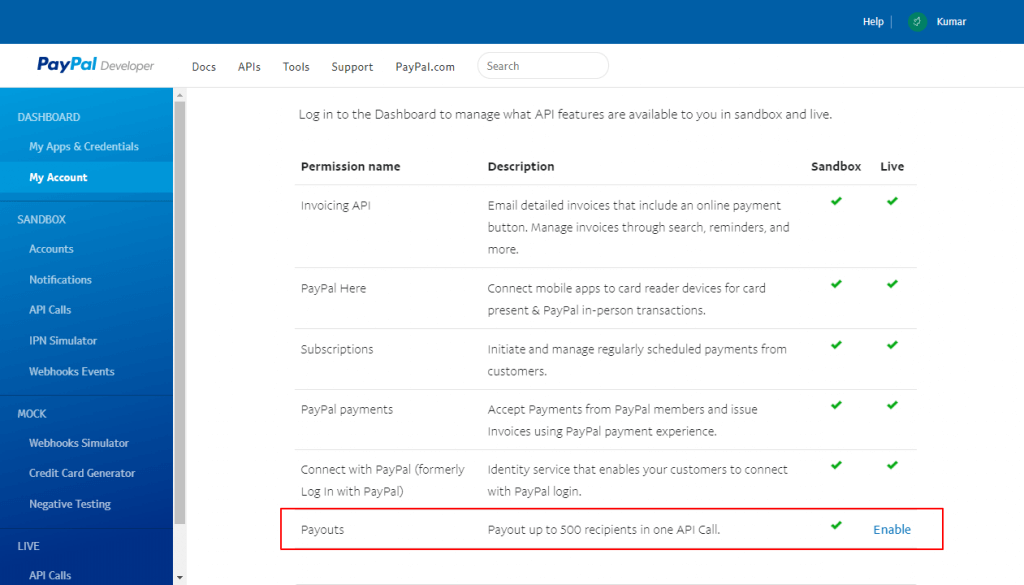
My Account PayPal Developer

Configuring Instructor Payout Settings #

Now that the API application is set up on your PayPal account, log into your website as admin and visit LearnDash LMS > Instructor > PayPal Payouts.
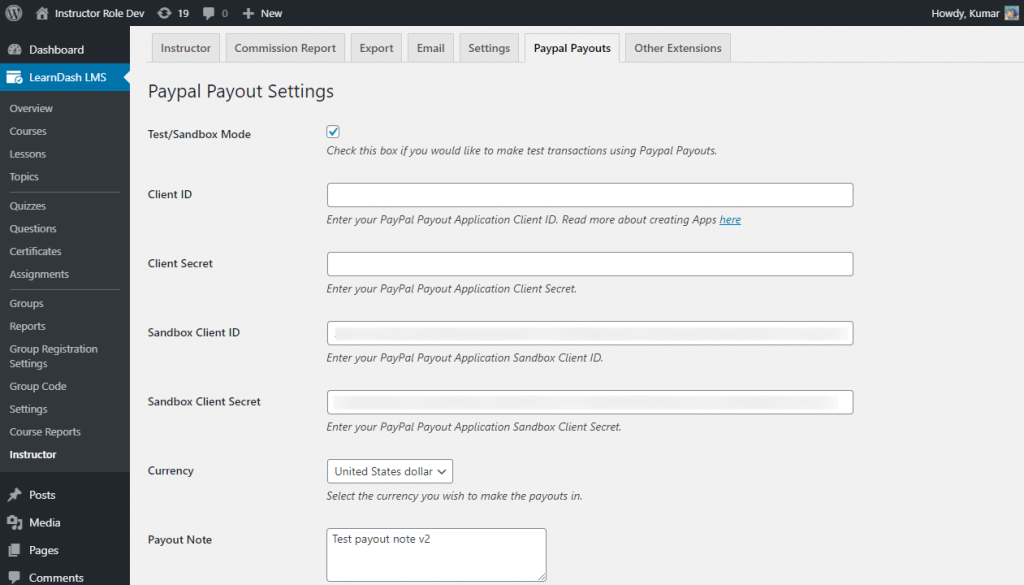
Instructor Payout Settings

Configure all the necessary settings and click on save to save them. Instructors need to save their PayPal email addresses from the Instructor Dashboard by accessing the Profile section.
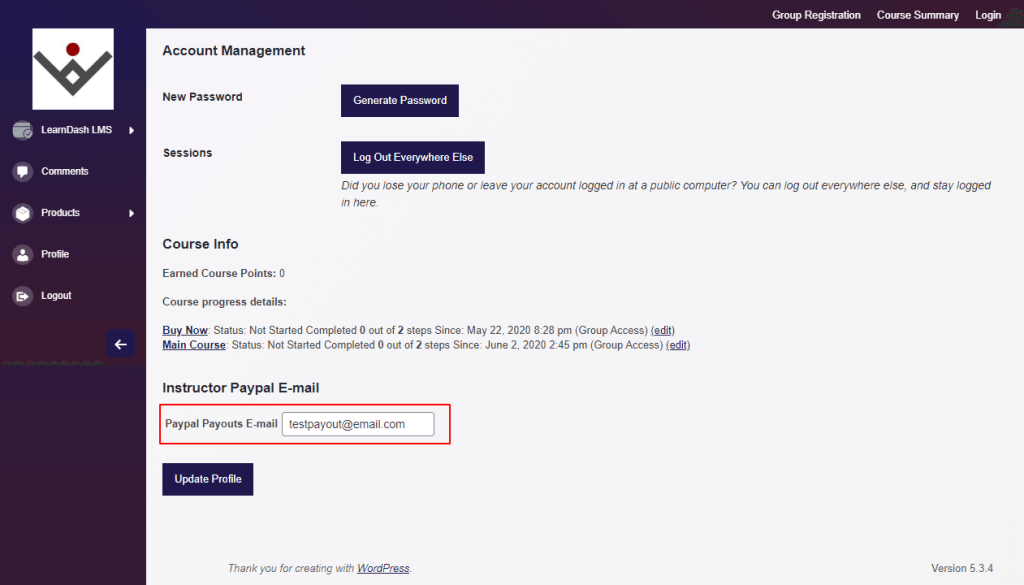
Instructor PayPal Email Settings Screenshot

Subscription Products and Instructor Commissions #

Instructor commissions for WooCommerce subscription products are only paid on the first payment. This is the intended behavior of the Instructor Role plugin.

  • When a customer purchases a subscription product linked to a course, the instructor will receive the commission percentage you set only on the initial payment.
  • Subsequent recurring payments on that subscription will not trigger additional commissions automatically.

This design ensures that commissions are calculated on the initial sale rather than for every installment.

Updated on July 25, 2025
Table of Contents
  • How to Create a WooCommerce Product in The Instructor Dashboard
  • Set up Paypal Payouts for Instructors
  • Prerequisites for using PayPal Payouts
  • How to request access to PayPal Payouts
  • Activating Payouts
  • Creating a new API Application
  • Configuring Instructor Payout Settings
  • Subscription Products and Instructor Commissions

Was this Doc Useful?

Thanks for your feedback!

Products

  • LearnDash LMS Plugin
  • MemberDash Plugin
  • LearnDash Cloud
  • ProPanel
  • Groups Management
  • Gradebook
  • Notes
  • Integrations

Support

  • Contact Us
  • Experts
  • Documentation
  • Facebook Community

Company

  • About LearnDash
  • Brand Assets
  • Careers
  • Affiliates
  • Privacy Policy
  • Terms and Conditions
  • Refund Policy

Our Partners

  • The Events Calendar
  • MemberDash
  • Kadence
  • GiveWP
  • Iconic
  • SolidWP

Stay Connected Subscribe to our newsletter
  • YouTube
  • X
  • Facebook
  • Instagram

Copyright 2026. All Rights Reserved.

A Liquid Web Brand
WordPress Hosting Services
© 2026 All Rights Reserved

StellarWP
liquidweb