Skip to content
LearnDash Support
  • Products

      LearnDash LMS Plugin

      Powering intuitive online courses with advanced management and engagement features for WordPress.

      Learn More

      LearnDash LMS Plugin + Hosting

      StellarSites Learning is a fully managed hosting solution for WordPress.

      Learn More

      Premium LMS Add-ons
      Enhance your courses with extra features. Gather insights, reward learners, protect your course content, and more!

      Explore all Add-ons

      MemberDash
      The most flexible membership plugin for WordPress. Monetize your content and build a community.

      View MemberDash

  • Pricing
  • Add-ons & Integrations

      LEARNDASH ADD-ONS

      Instructor Role

      Empower Instructor to manage courses.

      Groups Management

      Organization management, delegation and more

      ProPanel

      Advanced analytics reporting.

      Gradebook

      Track progress and create report cards.

      Notes

      Enable notetaking and two-way communication.

      Rating, Reviews, & Feedback

      Build trust and gain valuable insights.

      FEATURED INTEGRATIONS

      The Events Calendar

      Connect with the most popular events solution.

      BuddyBoss

      Powerful tools for an enhance learning experience.

      WooCommerce

      The most popular shopping cart on WordPress.

      WeGlot

      Translate your LearnDash content.

      All Integrations

      BUNDLES

      Package and save
      Save when you buy multiple plugins in a bundle.

      See all bundles.

      MORE

      Release Notes

      Get Help

  • Resources
      LearnDash Academy Videos, webinars, and resources to help you launch a successful course.
      Blog Blog
articles with the latest news and tips to help you run high-quality courses.
      Knowledge Base A support network to help you make the most of your courses.
      Release Notes Stay up-to-date with the latest updates to LearnDash.
      Get Help

      Professional Services

      LMS Site Development Get hands-on assistance launching your course website.
      Website Maintenance WordPress management made easy.
      SEO Services SEO solutions that accelerate growth.

      Other Resources

      LearnDash Accessibility At LearnDash, we believe online learning should be accessible to everyone.
      Join the Dev Club
  • Demo
  • Sign In
Get LearnDash

Knowledge Bases: Support Home | LearnDash Core | LearnDash Add-ons | LearnDash Cloud | Resources | Mobile App

LearnDash Support
  • ← Return to LearnDash
  • Support
    • Support Home
    • All Knowledge Bases
    • LearnDash Core
    • Add-ons
    • Resources
    • Cloud
  • My Account
Popular searches: api duplicate couse email gp query loop [ld_course_resume]

Getting Started with LearnDash

13
  • Setting Up Your First Course with LearnDash
  • Getting Started
  • LearnDash Overview
  • Technical Requirements
  • The Onboarding Wizard
  • Installation
  • LearnDash Core
  • Orders
  • Shortcodes and Blocks
  • Coupons
  • How to Use the Design Wizard
  • The Design Wizard
  • Style Customizer

Courses

14
  • Course Grid
  • Course Enrollment Mode Settings
  • Course Builder
  • Courses
  • Shared Course Steps
  • Course Display & Content Settings
  • Course Sections
  • Course Progression
  • Course Page
  • Course Create Wizard
  • Course Outline Builder
  • Pre-Selling
  • Course Dashboard
  • Course Completion Page

Lessons

9
  • Video Progression
  • Global Lesson Settings
  • Lesson Access Settings
  • Lessons
  • Lesson Display and Content Settings
  • Lesson Page Content
  • Sample (Free) Lessons
  • Lesson Access Settings
  • Blended Learning

Topics

5
  • Topics
  • Global Topic Settings
  • Topic Display and Content Settings
  • Topic Page Content
  • Topic Display & Content Settings

Quizzes

12
  • XML Quiz Import/Export Guide
  • Global Quiz Settings
  • Quiz Builder
  • Quizzes
  • Quiz Display & Content Settings
  • Quiz Results Display
  • Quiz Custom Fields
  • Quiz Leaderboard
  • Quiz Email Notifications
  • Manage & Grade Essays
  • Quiz AI Builder
  • Quiz Access & Progression

Questions

1
  • Quiz Questions

Certificates

3
  • Certificates
  • Create a Certificate
  • Certificate Shortcodes

Groups

11
  • Group Administration
  • User Groups
  • Global Group Settings
  • Group Page
  • Group Display and Content Settings
  • Group Access Settings
  • Group Courses
  • Group Users and Group Leaders
  • Publishing and Viewing a Group
  • Group Leader Capabilities
  • Group Cohorts

Challenge Exams

1
  • Challenge Exams

Assignments

4
  • Assignments
  • Global Assignment Settings
  • Manage Assignments
  • Enable Assignments

Reports

3
  • SCORM and xAPI
  • Reporting
  • How to disable core reports

Settings

13
  • Custom Labels
  • Global Course Settings
  • Login and Registration
  • Settings
  • Permalinks (URLs)
  • General Settings
  • Focus Mode
  • Payments
  • Advanced Options
  • Emails – LearnDash General Settings for Notifications and Senders
  • Razorpay Integration
  • Cloning
  • Experiments

Users

5
  • Users and Groups
  • User Data
  • User Management
  • User Profiles
  • Extend Access

Design

1
  • Widgets
View Categories
  • Home
  • All Knowledge Bases
  • LearnDash Core
  • Quizzes
  • Global Quiz Settings

Global Quiz Settings

The LearnDash quiz settings screen is where you can set some global options that will apply to all quizzes on your site. Quiz settings are organized into a few sections, outlined below.

To access your global quiz settings:

  1. Navigate to LearnDash LMS > Quizzes
  2. Click the Settings tab
LearnDash global quiz settings tab

Global Quiz Management & Display Settings #

LearnDash quiz management & display settings

Quiz Builder #

The quiz builder is enabled by default. It simplifies quiz creation and can save you a ton of time, especially for more complex quizzes with many questions.

It can be disabled, but we recommend leaving it enabled.

Learn how to use the quiz builder

When the quiz builder is enabled, you have a few additional options:

  • Questions Displayed: This signifies the number of questions that will appear in the quiz builder, before showing pagination at the bottom. For large quizzes, decreasing this number could make your quizzes easier to manage with the builder.
  • Shared Quiz Questions: Enable this setting if you want to use the same question across multiple quizzes.

WARNING: Once shared quiz questions is enabled, it should not be disabled without careful consideration. Any question associated to multiple quizzes will lose its association if the setting is disabled.

Custom Quiz Time Formats #

By default, LearnDash will use your default WordPress date and time format for quiz statistics and the quiz leaderboard. Toggle this setting on if you’d like to use a custom date/time format. Once enabled, you’ll have two options:

  • Statistic time format
  • Leaderboard time format

Each one can be set individually.

Quiz Template Management #

If you are using quiz templates, this section allows you to delete a quiz template, or update an existing template’s title.

  1. Choose the quiz template from the dropdown menu
  2. (Optional): Edit the template title
  3. Click Update to update the title, or Delete to delete that template

Quiz Email Settings #

LearnDash global quiz email settings
Set up email notifications for your students when they complete a quiz

Please see our full documentation on quiz email notifications

Quiz Taxonomies (Categories & Tags) #

LearnDash quiz taxonomy global settings
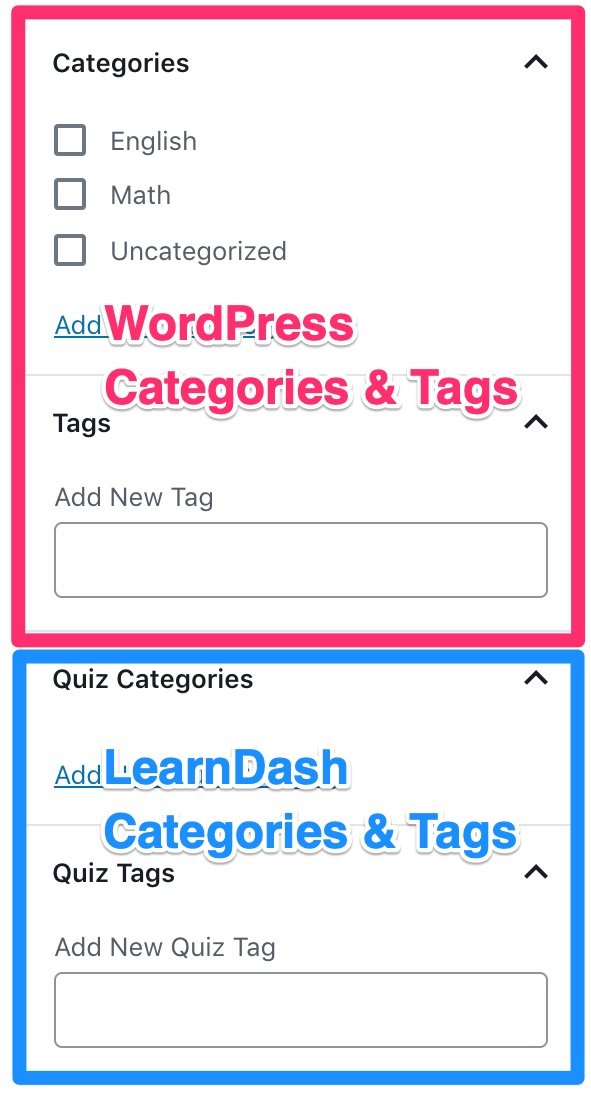
Example of LearnDash categories & tags

Using quiz taxonomies is completely optional, but they provide an additional way to organize your quizzes.

  • LearnDash Quiz Categories: This enables you to organize your quizzes into custom categories that are only available for LearnDash quizzes.
  • LearnDash Quiz Tags: This enables you to organize your quizzes using custom tags that are only available for LearnDash quizzes.
  • WordPress Post Categories: This enables you to organize your quizzes using WordPress default category management system. These categories can be viewed and managed in the WordPress admin under Posts > Catagories.You can share them amongst both the Posts and Quizzes post types.
  • WordPress Post Tags: This enables you to organize your quizzes using WordPress default tag management system. These tags can be viewed and managed in the WordPress admin under Posts > Tags. You can share them amongst both the Posts and Quizzes post types.

If youve enabled these options, when you go to edit a quiz, youll see each of them in the sidebar of the editing screen. In the above screenshot, WordPress categories and tags are shown in pink, while LearnDash categories and tags are shown in blue.

WordPress has a good article on the difference between categories and tags, and when and how to use each one.

Managing Categories & Tags #

You can manage (add, edit, or delete) the WordPress and LearnDash Categories and Tags via the Actions menu:

  1. Navigate to LearnDash LMS > Quizzes
  2. Select the Actions dropdown menu
  3. Select your desired menu option

Quiz Custom Post Types #

LearnDash quiz custom post type settings
Settings for Quizz Custo Post Types

These options will apply globally to all LearnDash quizzes on your site:

  • Quiz Search: Enable this setting if you want quizzes to be included in search results when using the default WordPress search form on the front-end of your site. In most cases, we recommend leaving this disabled.

NOTE: Quiz Search has nothing to do with Google search results. This setting only applies when using the built-in WordPress search form on your website.

  • Archive Page: Enable this setting if you want visitors to be able to access the default quiz archive page. When enabled, a preview of the URL is displayed.
  • Note:The design of this page is controlled by your theme, not by LearnDash.
    • You need to re-save your permalinks after updating this setting.
    • In most cases, we recommend leaving this disabled.
  • RSS/Atom Feed: Enable this setting if you want to include LearnDash quizzes in the RSS feed of your site.
  • Editor Supported Settings: You can choose which features of WordPress youd like to enable for the Quiz post type.
    • Featured Image
    • Comments
    • Custom Fields
    • Revisions
Updated on November 22, 2024
XML Quiz Import/Export GuideQuiz Builder
Table of Contents
  • Global Quiz Management & Display Settings
    • Quiz Builder
    • Custom Quiz Time Formats
    • Quiz Template Management
  • Quiz Email Settings
  • Quiz Taxonomies (Categories & Tags)
    • Managing Categories & Tags
  • Quiz Custom Post Types

Was this Doc Useful?

Thanks for your feedback!

Products

  • LearnDash LMS Plugin
  • MemberDash Plugin
  • LearnDash Cloud
  • ProPanel
  • Groups Management
  • Gradebook
  • Notes
  • Integrations

Support

  • Contact Us
  • Experts
  • Documentation
  • Facebook Community

Company

  • About LearnDash
  • Brand Assets
  • Careers
  • Affiliates
  • Privacy Policy
  • Terms and Conditions
  • Refund Policy

Our Partners

  • The Events Calendar
  • MemberDash
  • Kadence
  • GiveWP
  • Iconic
  • SolidWP

Stay Connected Subscribe to our newsletter
  • YouTube
  • X
  • Facebook
  • Instagram

Copyright 2026. All Rights Reserved.

A Liquid Web Brand
WordPress Hosting Services
© 2026 All Rights Reserved

StellarWP
liquidweb