
Skip to content
LearnDash Support
  • Products

      LearnDash LMS Plugin

      Powering intuitive online courses with advanced management and engagement features for WordPress.

      Learn More

      LearnDash LMS Plugin + Hosting

      StellarSites Learning is a fully managed hosting solution for WordPress.

      Learn More

      Premium LMS Add-ons
      Enhance your courses with extra features. Gather insights, reward learners, protect your course content, and more!

      Explore all Add-ons

      MemberDash
      The most flexible membership plugin for WordPress. Monetize your content and build a community.

      View MemberDash

  • Pricing
  • Add-ons & Integrations

      LEARNDASH ADD-ONS

      Instructor Role

      Empower Instructor to manage courses.

      Groups Management

      Organization management, delegation and more

      ProPanel

      Advanced analytics reporting.

      Gradebook

      Track progress and create report cards.

      Notes

      Enable notetaking and two-way communication.

      Rating, Reviews, & Feedback

      Build trust and gain valuable insights.

      FEATURED INTEGRATIONS

      The Events Calendar

      Connect with the most popular events solution.

      BuddyBoss

      Powerful tools for an enhance learning experience.

      WooCommerce

      The most popular shopping cart on WordPress.

      WeGlot

      Translate your LearnDash content.

      All Integrations

      BUNDLES

      Package and save
      Save when you buy multiple plugins in a bundle.

      See all bundles.

      MORE

      Release Notes

      Get Help

  • Resources
      LearnDash Academy Videos, webinars, and resources to help you launch a successful course.
      Blog Blog
articles with the latest news and tips to help you run high-quality courses.
      Knowledge Base A support network to help you make the most of your courses.
      Release Notes Stay up-to-date with the latest updates to LearnDash.
      Get Help

      Professional Services

      LMS Site Development Get hands-on assistance launching your course website.
      Website Maintenance WordPress management made easy.
      SEO Services SEO solutions that accelerate growth.

      Other Resources

      LearnDash Accessibility At LearnDash, we believe online learning should be accessible to everyone.
      Join the Dev Club
  • Demo
  • Sign In
Get LearnDash

Knowledge Bases: Support Home | LearnDash Core | LearnDash Add-ons | LearnDash Cloud | Resources | Mobile App

LearnDash Support
  • ← Return to LearnDash
  • Support
    • Support Home
    • All Knowledge Bases
    • LearnDash Core
    • Add-ons
    • Resources
    • Cloud
  • My Account
Popular searches: api duplicate couse email gp query loop [ld_course_resume]

ProPanel

1
  • ProPanel

Instructor Role

34
  • Intro to Instructor Role
  • Instructor Overview Page
  • Instructor Dashboard
  • Instructor Dashboard Menu
  • Adding Instructors
  • Multiple Instructors
  • Instructor Commissions
  • Selling Courses Through WooCommerce
  • Instructor Profile
  • Profile Introduction Sections
  • Create Learning Content And Quizzes
  • Instructor Role Reports
  • Instructor Notifications
  • Instructor Role Email Settings
  • Review Instructor Course Updates
  • Instructor Groups Access
  • Instructor Comments Access
  • Student Teacher Communication
  • Multiple Instructors Shortcode
  • Instructor Dashboard Settings
  • Instructor Role Color Schemes
  • Commission Logs
  • Instructor Role Navigation Settings
  • Instructor Role Overview Settings
  • Instructor Role Menu Settings
  • Frontend Course Creator
  • Frontend Quiz Creator
  • Frontend Dashboard: Installation Guide
  • Frontend Dashboard for Instructors: Gutenberg Blocks List
  • How to Customize the Frontend Dashboard
  • How to disable the WordPress admin page for Instructors
  • Introducing Frontend Dashboard
  • Elementor Compatibility
  • Setup PayPal Payouts for Instructors

Ratings, Reviews, & Feedback

1
  • Ratings, Reviews, & Feedback

Elementor Add-on

1
  • LearnDash Elementor Addon

Groups Plus

6
  • Group Leader
  • Create an Organization
  • Getting Started with Groups Plus
  • WooCommerce LearnDash Teams Products
  • Front-end Dashboard
  • Groups Plus FAQ

2Checkout Add-on

1
  • 2Checkout Integration

bbPress Add-on

1
  • bbPress Integration

Easy Digital Downloads Add-on

1
  • Easy Digital Downloads Integration

Event Espresso Add-on

1
  • Event Espresso Integration

Gravity Forms Add-on

1
  • Gravity Forms Integration

MemberPress Add-on

1
  • MemberPress Integration

Notifications Add-on

1
  • Notifications Add-On

Paid Memberships Pro Add-on

1
  • Paid Memberships Pro Integration

Restrict Content Pro Add-on

1
  • Restrict Content Pro Integration

SamCart Add-on

1
  • SamCart Integration

Stripe Add-on

1
  • Stripe Add-on Deprecation FAQ

The Events Calendar Add-on

1
  • The Events Calendar Integration

ThriveCart Add-on

1
  • ThriveCart Integration

WooCommerce Add-on

1
  • WooCommerce Integration

Zapier Add-on

1
  • Zapier Integration

Compatibility Add-on

1
  • Compatibility Add-Ons

Certificate Builder Add-on

1
  • Certificate Builder Add-On

Achievements Add-on

1
  • Achievements Add-On

Integrity Add-on

1
  • Integrity Add-on

3rd Party Plugins

1
  • 3rd Party Plugins

Gradebook

1
  • Gradebook Add-On

Notes Add-on

1
  • Notes Add-On

Groups Management

4
  • Groups Management
  • Global Settings
  • Groups Plus Add-On
  • Group Registration for LearnDash
View Categories
  • Home
  • All Knowledge Bases
  • Add-ons
  • Instructor Role
  • Student Teacher Communication

Student Teacher Communication

Do you know what to do when a Student has a course-related question to ask? Yes, the plugin has a new Student-Teacher Communication feature that helps students communicate with a course instructor from the lesson or topic page itself.

Pre-requisites #

Listed below are the prerequisites, you will need to use the student communication feature:

  • The BuddyPress plugin should be installed and activated
  • The private messaging module must be enabled in Buddypress

If you are using the BuddyBoss theme, then instead of the BuddyPress plugin you need to have the BuddyBoss Platform add-on installed and activated.

Settings #

To enable the student-teacher communication feature, go to LearnDash LMS > Instructor > Settings, check the Student Communication checkbox, and save the updated settings.
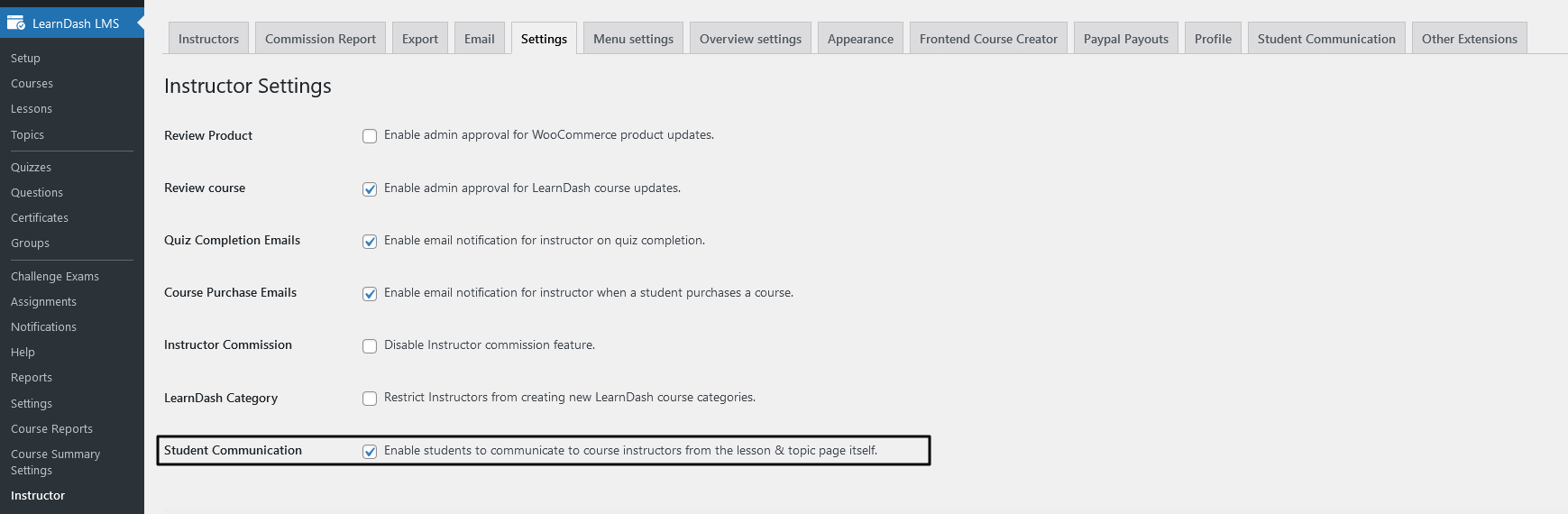
Enable student communication setting

NOTE: The student-teacher communication only works with the LearnDash 3.0 Template with Focus mode enabled so make sure you have them enabled from LearnDash LMS Settings.

LearnDash Active Template Setting

Communicate with Instructors #

Once you have all the settings properly configured, the students will be able to communicate with the course instructors for any course lesson or topic from the lesson or topic page itself.

Sending new Doubts #

A user can send a new doubt related to a lesson/topic of a course from the button at the bottom right corner.
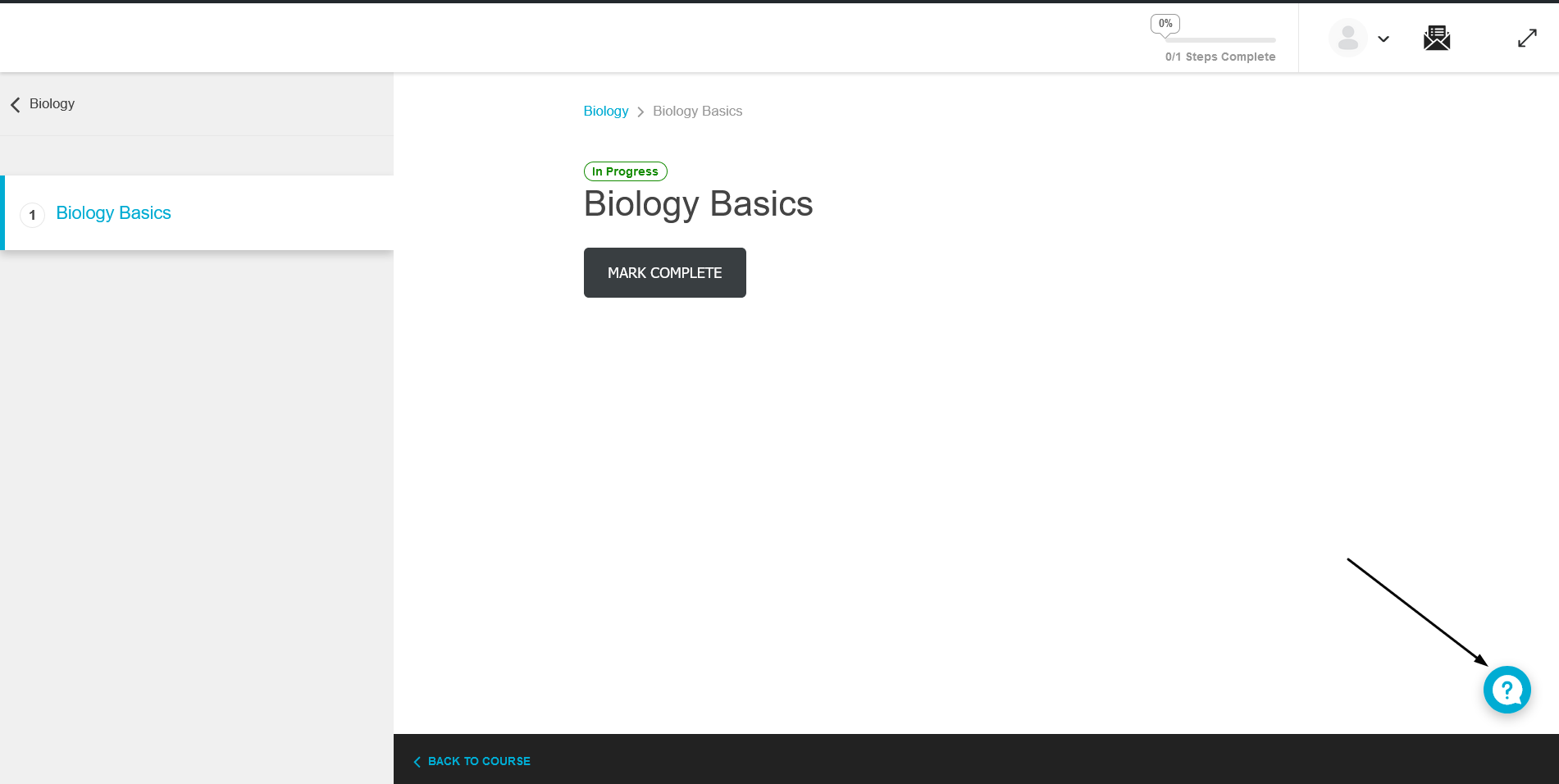
Send new doubt button

After clicking on the button, click on theSend your doubtsbutton to send a new doubt.

Send your doubts button

This will open up a new pop-up box for students to write the subject and description of their query along with the related lesson and topic. The lesson and/or topic will be pre-selected for the current lesson/topic.
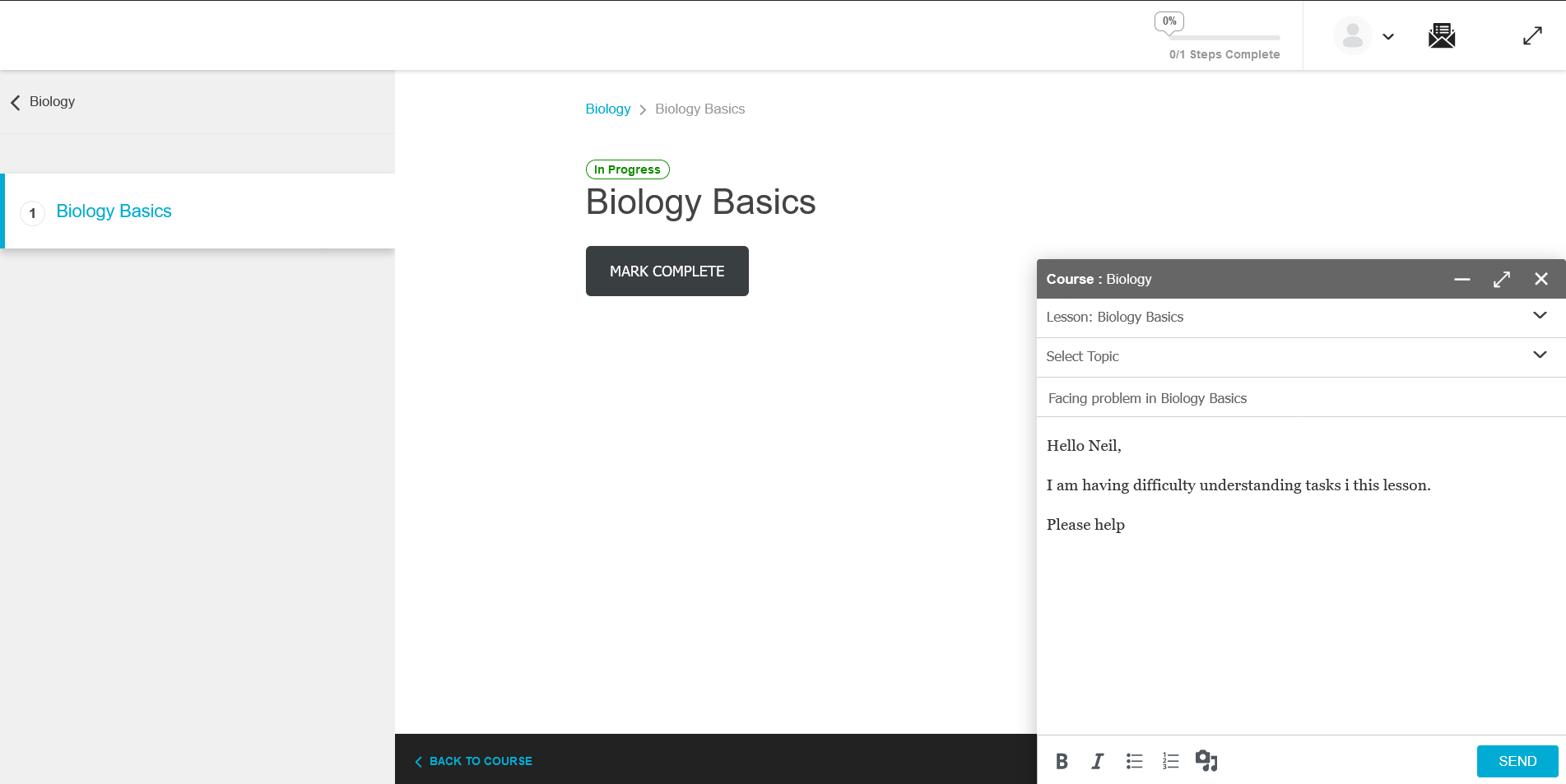
Send new doubt modal

Click on Send to send your doubt to the instructor.

Replying to Doubts #

Instructors will be able to see all the doubts in the Buddypress private message inbox. They can send replies to user doubts from there.
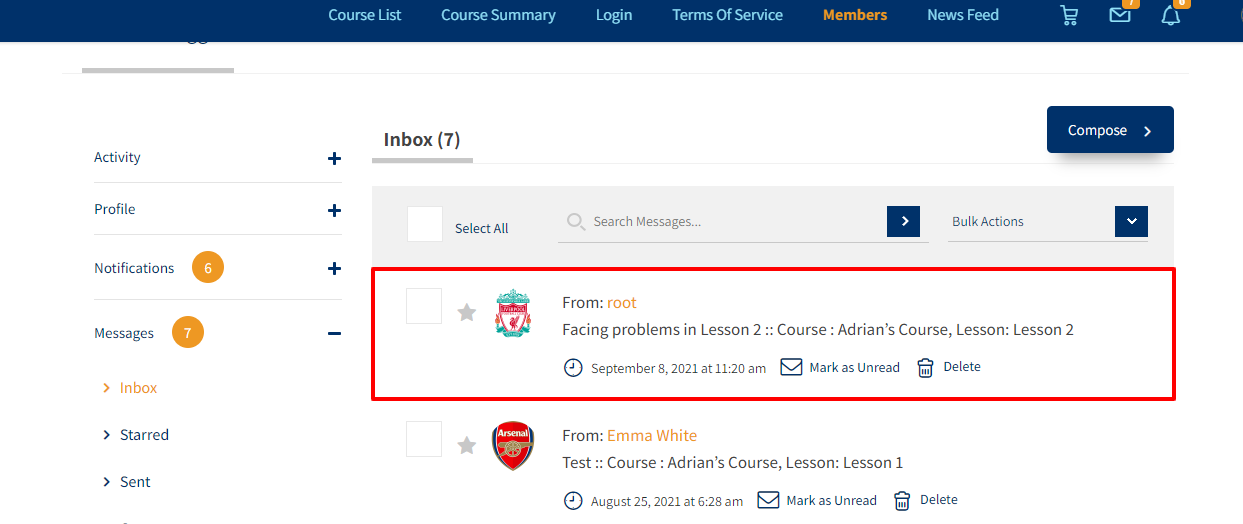
Buddypress Private Message Inbox

Users can then View the instructors reply and continue the conversation from the lesson/topic page itself.
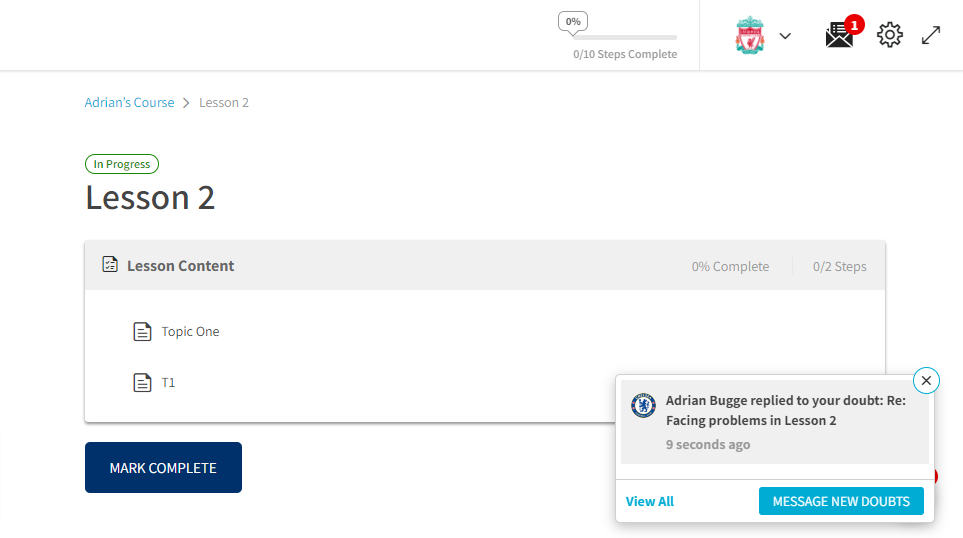
View and reply to instructor doubts from the lesson/topic page.

Students can also have multiple doubts about the same lesson/topic. Clicking on the bottom right button will open a list of all threads for the current lesson/topic. Click on the thread to load the conversation in the pop-up box.
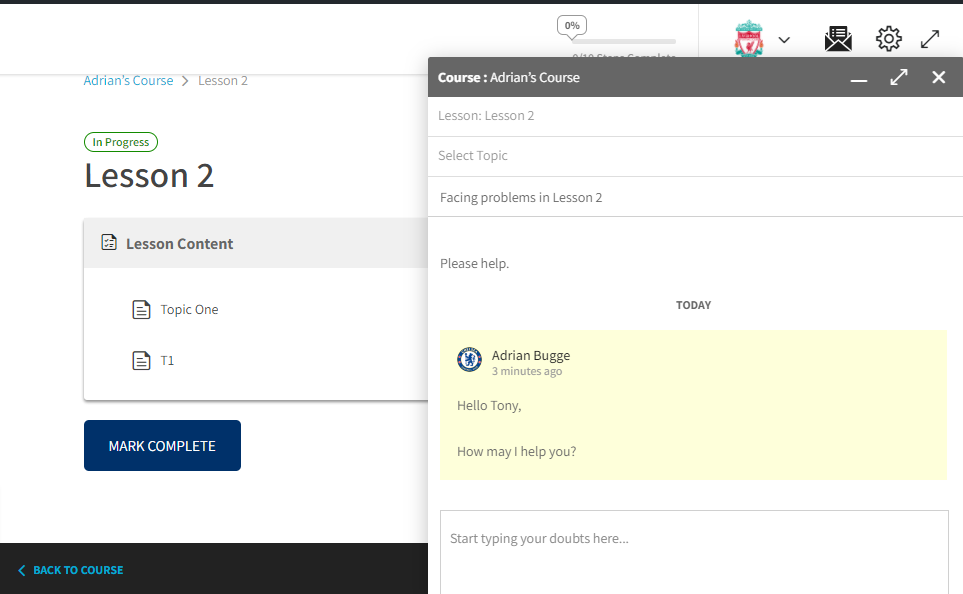
Reply to instructors reply from the pop-up box

View all Doubts #

Users can also see a list of recent doubts across all courses from the header. Clicking on a thread here will take the user to the Buddypress private message inbox.

Updated on December 13, 2024
Instructor Comments AccessMultiple Instructors Shortcode
Table of Contents
  • Pre-requisites
  • Settings
    • Communicate with Instructors
    • Sending new Doubts
    • Replying to Doubts
    • View all Doubts

Was this Doc Useful?

Thanks for your feedback!

Products

  • LearnDash LMS Plugin
  • MemberDash Plugin
  • LearnDash Cloud
  • ProPanel
  • Groups Management
  • Gradebook
  • Notes
  • Integrations

Support

  • Contact Us
  • Experts
  • Documentation
  • Facebook Community

Company

  • About LearnDash
  • Brand Assets
  • Careers
  • Affiliates
  • Privacy Policy
  • Terms and Conditions
  • Refund Policy

Our Partners

  • The Events Calendar
  • MemberDash
  • Kadence
  • GiveWP
  • Iconic
  • SolidWP

Stay Connected Subscribe to our newsletter
  • YouTube
  • X
  • Facebook
  • Instagram

Copyright 2026. All Rights Reserved.

A Liquid Web Brand
WordPress Hosting Services
© 2026 All Rights Reserved

StellarWP
liquidweb