
Skip to content
LearnDash Support
  • Products

      LearnDash LMS Plugin

      Powering intuitive online courses with advanced management and engagement features for WordPress.

      Learn More

      LearnDash LMS Plugin + Hosting

      StellarSites Learning is a fully managed hosting solution for WordPress.

      Learn More

      Premium LMS Add-ons
      Enhance your courses with extra features. Gather insights, reward learners, protect your course content, and more!

      Explore all Add-ons

      MemberDash
      The most flexible membership plugin for WordPress. Monetize your content and build a community.

      View MemberDash

  • Pricing
  • Add-ons & Integrations

      LEARNDASH ADD-ONS

      Instructor Role

      Empower Instructor to manage courses.

      Groups Management

      Organization management, delegation and more

      ProPanel

      Advanced analytics reporting.

      Gradebook

      Track progress and create report cards.

      Notes

      Enable notetaking and two-way communication.

      Rating, Reviews, & Feedback

      Build trust and gain valuable insights.

      FEATURED INTEGRATIONS

      The Events Calendar

      Connect with the most popular events solution.

      BuddyBoss

      Powerful tools for an enhance learning experience.

      WooCommerce

      The most popular shopping cart on WordPress.

      WeGlot

      Translate your LearnDash content.

      All Integrations

      BUNDLES

      Package and save
      Save when you buy multiple plugins in a bundle.

      See all bundles.

      MORE

      Release Notes

      Get Help

  • Resources
      LearnDash Academy Videos, webinars, and resources to help you launch a successful course.
      Blog Blog
articles with the latest news and tips to help you run high-quality courses.
      Knowledge Base A support network to help you make the most of your courses.
      Release Notes Stay up-to-date with the latest updates to LearnDash.
      Get Help

      Professional Services

      LMS Site Development Get hands-on assistance launching your course website.
      Website Maintenance WordPress management made easy.
      SEO Services SEO solutions that accelerate growth.

      Other Resources

      LearnDash Accessibility At LearnDash, we believe online learning should be accessible to everyone.
      Join the Dev Club
  • Demo
  • Sign In
Get LearnDash

Knowledge Bases: Support Home | LearnDash Core | LearnDash Add-ons | LearnDash Cloud | Resources | Mobile App

LearnDash Support
  • ← Return to LearnDash
  • Support
    • Support Home
    • All Knowledge Bases
    • LearnDash Core
    • Add-ons
    • Resources
    • Cloud
  • My Account
Popular searches: api duplicate couse email gp query loop [ld_course_resume]

ProPanel

1
  • ProPanel

Getting Started with LearnDash Cloud

6
  • LearnDash Cloud
  • How to Back Up Your Site
  • How to Get Support in LearnDash Cloud
  • Setting Up Your DNS to Use Your Own Domain Name
  • How to Connect a Domain
  • Logging In to Your LearnDash Cloud Site

Account & Billing

5
  • License
  • Updates
  • How To Get Help
  • Billing
  • LearnDash Licensing & Management

Troubleshooting

1
  • Troubleshooting Basics

User Guides

6
  • How do I remove the ‘Take This Course’ button?
  • How do I hide post meta data (date, author, comments, etc.)?
  • Translation
  • How do I protect my course files & downloads?
  • User Guides
  • Trusted Login

FAQs

11
  • How do I find the course ID?
  • Can I hide the course content table on the course page?
  • Can I create a unique sidebar for courses, lessons & quizzes?
  • Can I rename “courses,” “lessons,” “topics,” and “quizzes”?
  • Can I reuse lessons & topics across multiple courses?
  • Is LearnDash compatible with other plugins?
  • How can I make email notifications send on time?
  • Known Issues & Conflicts
  • Page Builders + LearnDash
  • FAQs
  • Your Add-Ons and Plugins are Officially Migrating to LearnDash FAQs

Getting Started with LearnDash

7
  • Getting Started
  • Technical Requirements
  • LearnDash Core
  • Shortcodes and Blocks
  • How to Use the Design Wizard
  • The Design Wizard
  • Style Customizer

Courses

12
  • Course Grid
  • Course Enrollment Mode Settings
  • Course Builder
  • Courses
  • Shared Course Steps
  • Course Display & Content Settings
  • Course Sections
  • Course Progression
  • Course Page
  • Pre-Selling
  • Course Dashboard
  • Course Completion Page

Lessons

9
  • Video Progression
  • Global Lesson Settings
  • Lesson Access Settings
  • Lessons
  • Lesson Display and Content Settings
  • Lesson Page Content
  • Sample (Free) Lessons
  • Lesson Access Settings
  • Blended Learning

Topics

2
  • Topics
  • Global Topic Settings

Quizzes

2
  • Quizzes
  • Quiz AI Builder

Questions

1
  • Quiz Questions

Groups

2
  • Group Administration
  • Group Cohorts

Assignments

1
  • Assignments

Reports

1
  • SCORM and xAPI

Instructor Role

15
  • Instructor Dashboard
  • Multiple Instructors
  • Instructor Commissions
  • Instructor Profile
  • Instructor Notifications
  • Instructor Role Email Settings
  • Instructor Groups Access
  • Instructor Comments Access
  • Student Teacher Communication
  • Multiple Instructors Shortcode
  • Instructor Dashboard Settings
  • Instructor Role Color Schemes
  • Commission Logs
  • Instructor Role Navigation Settings
  • Instructor Role Overview Settings

Settings

8
  • Custom Labels
  • Global Course Settings
  • Login and Registration
  • Settings
  • Permalinks (URLs)
  • General Settings
  • Focus Mode
  • Experiments

Groups Plus

2
  • Group Leader
  • WooCommerce LearnDash Teams Products

2Checkout Add-on

1
  • 2Checkout Integration

bbPress Add-on

1
  • bbPress Integration

Easy Digital Downloads Add-on

1
  • Easy Digital Downloads Integration

Event Espresso Add-on

1
  • Event Espresso Integration

Gravity Forms Add-on

1
  • Gravity Forms Integration

MemberPress Add-on

1
  • MemberPress Integration

Notifications Add-on

1
  • Notifications Add-On

Paid Memberships Pro Add-on

1
  • Paid Memberships Pro Integration

Restrict Content Pro Add-on

1
  • Restrict Content Pro Integration

SamCart Add-on

1
  • SamCart Integration

The Events Calendar Add-on

1
  • The Events Calendar Integration

WooCommerce Add-on

1
  • WooCommerce Integration

Zapier Add-on

1
  • Zapier Integration

3rd Party Plugins

1
  • 3rd Party Plugins

Users

4
  • Users and Groups
  • User Data
  • User Management
  • Extend Access

Developers

2
  • Developers
  • Protecting Files

Groups Management

1
  • Groups Plus Add-On

Going Live

3
  • How to Update Your Android Learndash App
  • How to Publish Your Android LearnDash App to the Google Play Store
  • Apple App Store Publishing Checklist – How to Prepare Your iOS Learndash App for Publishing on the Apple App Store

Managing Content for LearnDash App

1
  • How to Configure Your Tab Bar and More Screen

Done For You

1
  • How to Add LearnDash as a User to Your Google Developer Account

Getting Started with LearnDash MCP Server

2
  • LearnDash MCP FAQ
  • Getting Started with the LearnDash Model Context Protocol (MCP)

Plugins

1
  • Plugins Overview

Styling

1
  • Styling Overview
View Categories
  • Home
  • All Knowledge Bases
  • Migrating Recurring PayPal Subscriptions from Standard to Checkout

Migrating Recurring PayPal Subscriptions from Standard to Checkout

LearnDash introduced support for the PayPal Checkout API (see PayPal Checkout API Overview) in version 4.25, in response to PayPal’s upcoming retirement of their IPN (Standard) connection by the end of 2026. This legacy IPN system has already been deprecated.

Because PayPal does not allow subscription payments to be transferred between platforms, LearnDash has introduced a workaround to help customers with active recurring payments using the Standard gateway.

This guide explains how to:

  • Locate users currently enrolled via PayPal Standard recurring payments
  • Set up a migration page using a custom shortcode
  • Understand how the migration process works
  • Communicate with affected subscribers

Before You Start #

Ensure that both PayPal Standard and PayPal Checkout gateways are enabled and in live mode (not test mode) before beginning the migration process.
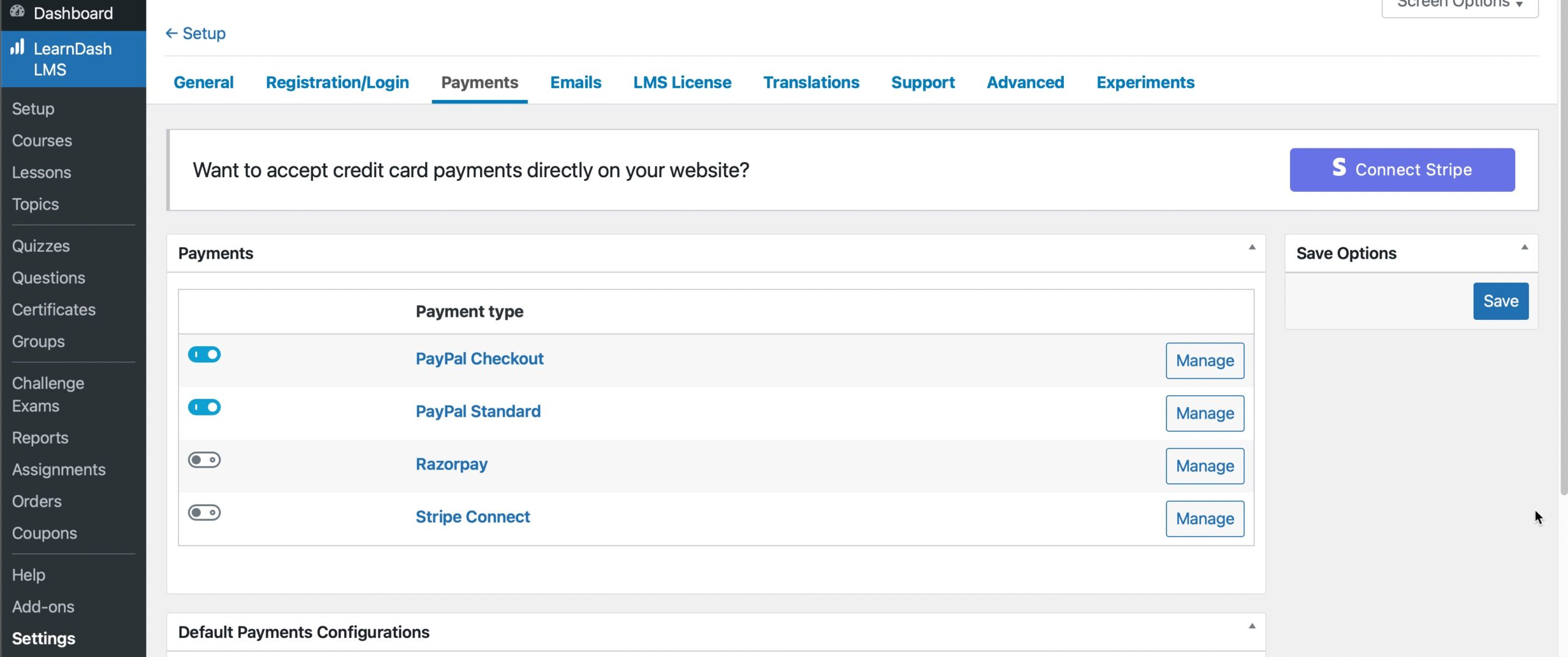
How to Find All Subscribers with Recurring Payments Using PayPal Standard #

Users who need to migrate will appear under:

LearnDash > Settings > PayPal Standard / Manage
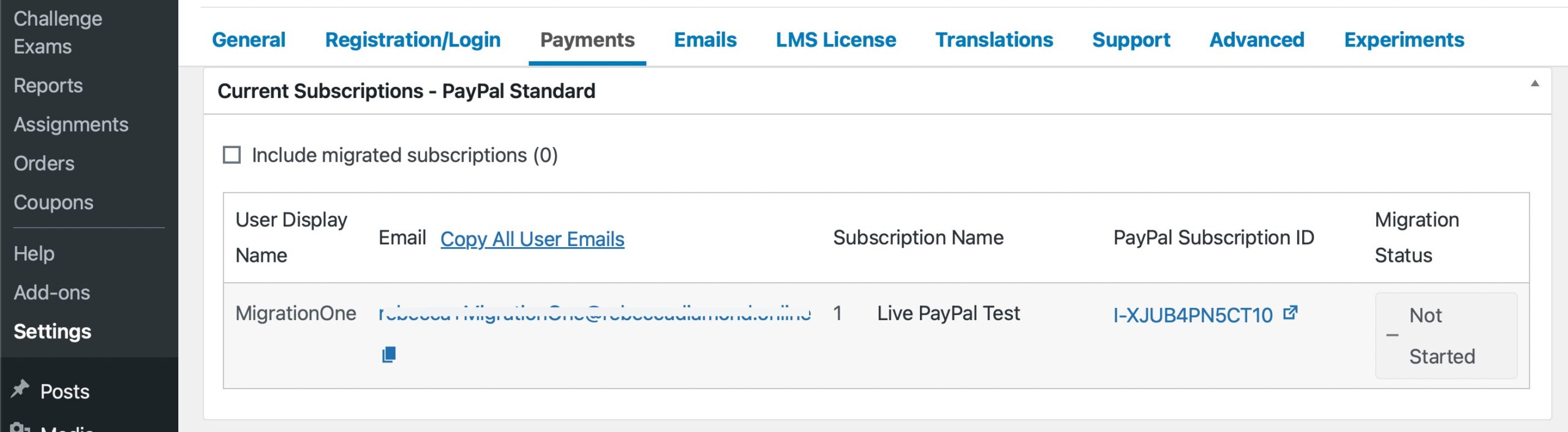
Use the “Copy All User Emails” button to capture the list of subscribers. This list can be pasted into your preferred email or CRM tool for outreach.

Tick the checkbox labeled “Include migrated subscriptions” if needed. By default, this view excludes users who have already migrated, allowing you to focus on those who still need action.

Setting Up Your Migration Page #

Create a new page in WordPress:

WordPress Dashboard > Pages > Add New

Use the following example to help inform the page content:

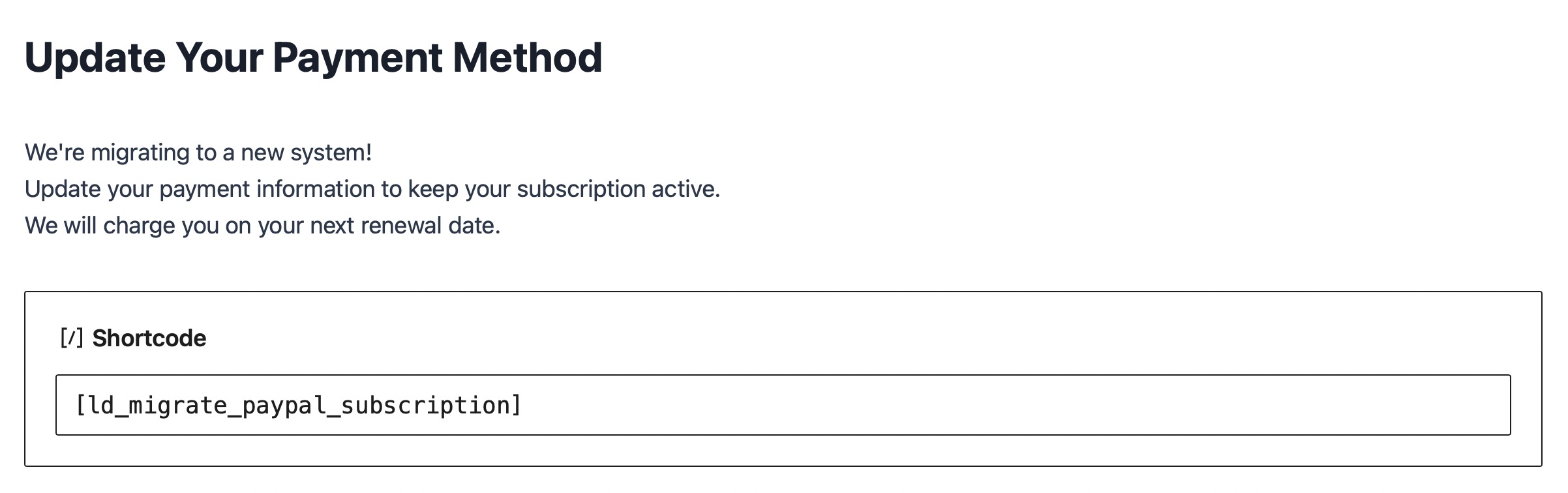
Title: Update Your Payment Method
Content:

We’re migrating to a new system!  

Update your payment information to keep your subscription active.  

We will charge you on your next renewal date.  

[ld_migrate_paypal_subscription]
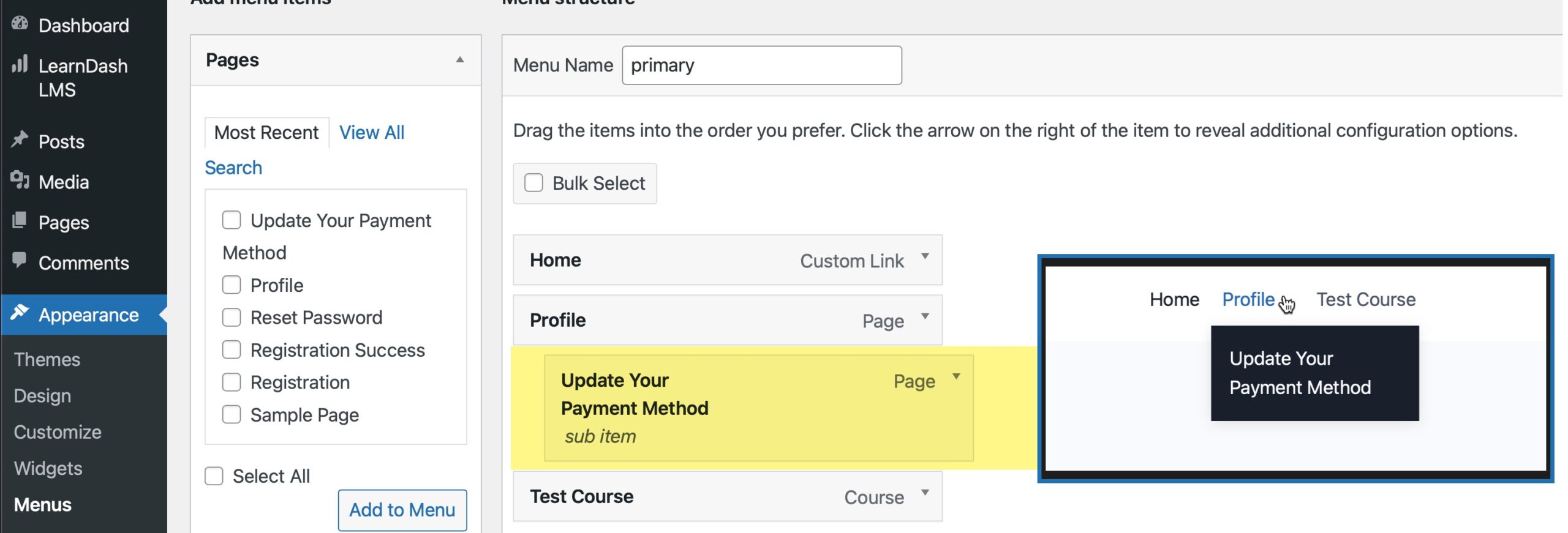
Tip: Add this page to your site navigation.

Go to Appearance > Menus and include it as a submenu item beneath “Profile.” This places the migration option conveniently under the user’s profile dropdown.
Once the shortcode is in place, the page will display a form where users can update their payment information.
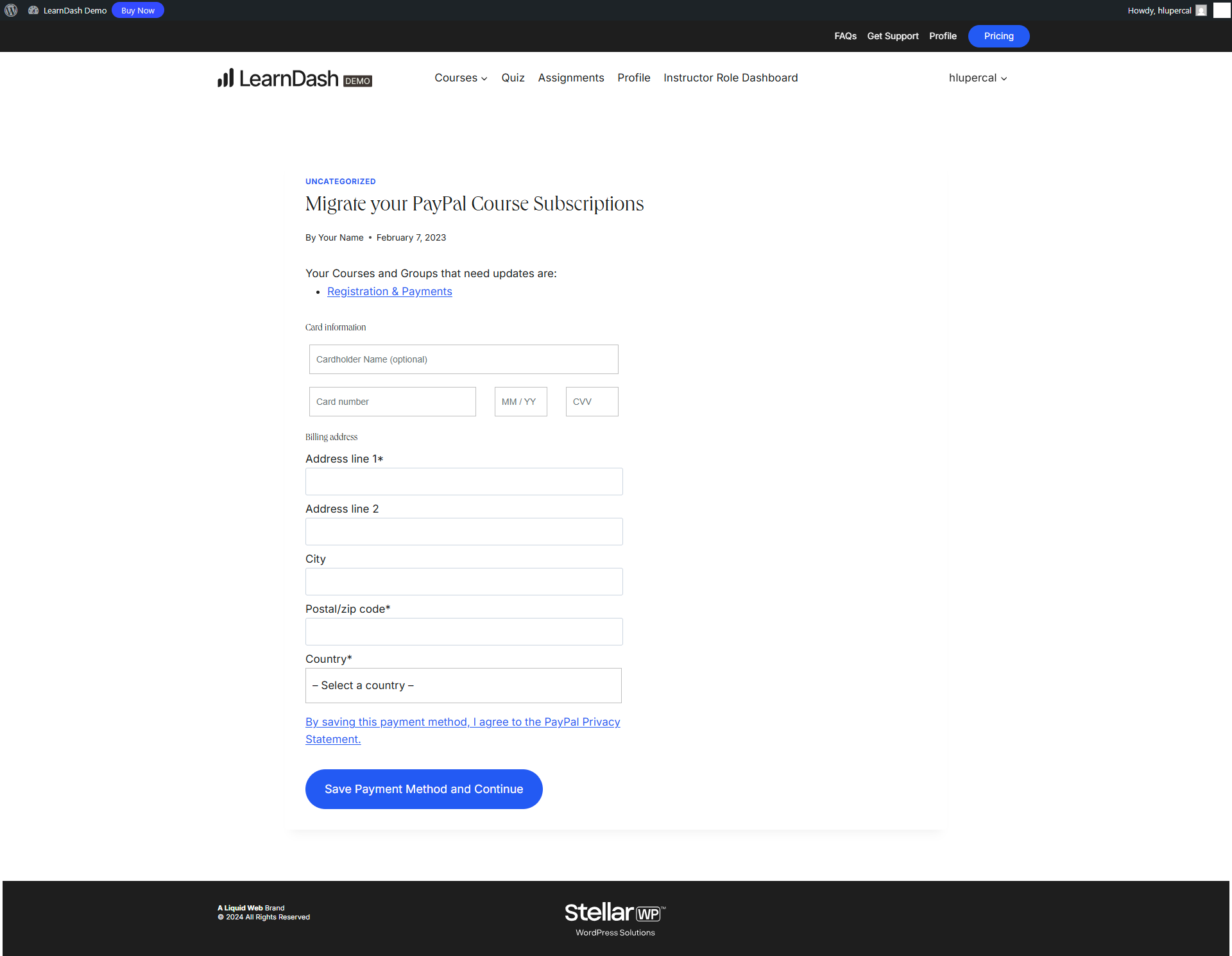
After completing the form, users will see a confirmation message.

How the Migration Works #

This process is not a full data migration. Instead, LearnDash creates a new subscription using PayPal Checkout and ends the previous one from PayPal Standard.

Here’s how it works:

  1. The user visits the migration page and sees a list of their active recurring-payment courses or groups.
  2. Based on the messaging added to the page, they are prompted to update their payment method.
  3. Users fill out the payment form generated by the [ld_migrate_paypal_subscription] shortcode.
    • Important: Updating payment information from the “Saved Cards” area in the profile block will not migrate subscriptions.
  4. Once submitted:
    • The subscription using PayPal Standard is cancelled
    • PayPal saves the new payment method in the PayPal Vault
    • On the user’s next renewal date, LearnDash starts a new subscription via PayPal Checkout
    • The saved card will now appear in the user’s LearnDash profile, along with all associated subscriptions

Communicating with Your Customers #

Once the migration page is ready, send a series of drip emails to affected customers to guide them through updating their payment method.

Consider the following:

  • Start with a clear announcement about the required action and deadline
  • Include a direct link to the migration page
  • Remind users that updating is necessary to avoid interruptions
  • Use follow-up reminders for those who haven’t completed the process

This outreach ensures subscribers remain enrolled without disruption, and that future renewals are processed through the new PayPal Checkout gateway.

Updated on April 21, 2026
Table of Contents
  • Before You Start
  • How to Find All Subscribers with Recurring Payments Using PayPal Standard
  • Setting Up Your Migration Page
  • How the Migration Works
  • Communicating with Your Customers

Was this Doc Useful?

Thanks for your feedback!

Products

  • LearnDash LMS Plugin
  • MemberDash Plugin
  • LearnDash Cloud
  • ProPanel
  • Groups Management
  • Gradebook
  • Notes
  • Integrations

Support

  • Contact Us
  • Experts
  • Documentation
  • Facebook Community

Company

  • About LearnDash
  • Brand Assets
  • Careers
  • Affiliates
  • Privacy Policy
  • Terms and Conditions
  • Refund Policy

Our Partners

  • The Events Calendar
  • MemberDash
  • Kadence
  • GiveWP
  • Iconic
  • SolidWP

Stay Connected Subscribe to our newsletter
  • YouTube
  • X
  • Facebook
  • Instagram

Copyright 2026. All Rights Reserved.

A Liquid Web Brand
WordPress Hosting Services
© 2026 All Rights Reserved

StellarWP
liquidweb