
Skip to content
LearnDash Support
  • Products

      LearnDash LMS Plugin

      Powering intuitive online courses with advanced management and engagement features for WordPress.

      Learn More

      LearnDash LMS Plugin + Hosting

      StellarSites Learning is a fully managed hosting solution for WordPress.

      Learn More

      Premium LMS Add-ons
      Enhance your courses with extra features. Gather insights, reward learners, protect your course content, and more!

      Explore all Add-ons

      MemberDash
      The most flexible membership plugin for WordPress. Monetize your content and build a community.

      View MemberDash

  • Pricing
  • Add-ons & Integrations

      LEARNDASH ADD-ONS

      Instructor Role

      Empower Instructor to manage courses.

      Groups Management

      Organization management, delegation and more

      ProPanel

      Advanced analytics reporting.

      Gradebook

      Track progress and create report cards.

      Notes

      Enable notetaking and two-way communication.

      Rating, Reviews, & Feedback

      Build trust and gain valuable insights.

      FEATURED INTEGRATIONS

      The Events Calendar

      Connect with the most popular events solution.

      BuddyBoss

      Powerful tools for an enhance learning experience.

      WooCommerce

      The most popular shopping cart on WordPress.

      WeGlot

      Translate your LearnDash content.

      All Integrations

      BUNDLES

      Package and save
      Save when you buy multiple plugins in a bundle.

      See all bundles.

      MORE

      Release Notes

      Get Help

  • Resources
      LearnDash Academy Videos, webinars, and resources to help you launch a successful course.
      Blog Blog
articles with the latest news and tips to help you run high-quality courses.
      Knowledge Base A support network to help you make the most of your courses.
      Release Notes Stay up-to-date with the latest updates to LearnDash.
      Get Help

      Professional Services

      LMS Site Development Get hands-on assistance launching your course website.
      Website Maintenance WordPress management made easy.
      SEO Services SEO solutions that accelerate growth.

      Other Resources

      LearnDash Accessibility At LearnDash, we believe online learning should be accessible to everyone.
      Join the Dev Club
  • Demo
  • Sign In
Get LearnDash

Knowledge Bases: Support Home | LearnDash Core | LearnDash Add-ons | LearnDash Cloud | Resources | Mobile App

LearnDash Support
  • ← Return to LearnDash
  • Support
    • Support Home
    • All Knowledge Bases
    • LearnDash Core
    • Add-ons
    • Resources
    • Cloud
  • My Account
Popular searches: api duplicate couse email gp query loop [ld_course_resume]

ProPanel

1
  • ProPanel

Getting Started with LearnDash Cloud

6
  • LearnDash Cloud
  • How to Back Up Your Site
  • How to Get Support in LearnDash Cloud
  • Setting Up Your DNS to Use Your Own Domain Name
  • How to Connect a Domain
  • Logging In to Your LearnDash Cloud Site

Account & Billing

5
  • License
  • Updates
  • How To Get Help
  • Billing
  • LearnDash Licensing & Management

Troubleshooting

1
  • Troubleshooting Basics

User Guides

6
  • How do I remove the ‘Take This Course’ button?
  • How do I hide post meta data (date, author, comments, etc.)?
  • Translation
  • How do I protect my course files & downloads?
  • User Guides
  • Trusted Login

FAQs

11
  • How do I find the course ID?
  • Can I hide the course content table on the course page?
  • Can I create a unique sidebar for courses, lessons & quizzes?
  • Can I rename “courses,” “lessons,” “topics,” and “quizzes”?
  • Can I reuse lessons & topics across multiple courses?
  • Is LearnDash compatible with other plugins?
  • How can I make email notifications send on time?
  • Known Issues & Conflicts
  • Page Builders + LearnDash
  • FAQs
  • Your Add-Ons and Plugins are Officially Migrating to LearnDash FAQs

Getting Started with LearnDash

7
  • Getting Started
  • Technical Requirements
  • LearnDash Core
  • Shortcodes and Blocks
  • How to Use the Design Wizard
  • The Design Wizard
  • Style Customizer

Courses

12
  • Course Grid
  • Course Enrollment Mode Settings
  • Course Builder
  • Courses
  • Shared Course Steps
  • Course Display & Content Settings
  • Course Sections
  • Course Progression
  • Course Page
  • Pre-Selling
  • Course Dashboard
  • Course Completion Page

Lessons

9
  • Video Progression
  • Global Lesson Settings
  • Lesson Access Settings
  • Lessons
  • Lesson Display and Content Settings
  • Lesson Page Content
  • Sample (Free) Lessons
  • Lesson Access Settings
  • Blended Learning

Topics

2
  • Topics
  • Global Topic Settings

Quizzes

2
  • Quizzes
  • Quiz AI Builder

Questions

1
  • Quiz Questions

Groups

2
  • Group Administration
  • Group Cohorts

Assignments

1
  • Assignments

Reports

1
  • SCORM and xAPI

Instructor Role

15
  • Instructor Dashboard
  • Multiple Instructors
  • Instructor Commissions
  • Instructor Profile
  • Instructor Notifications
  • Instructor Role Email Settings
  • Instructor Groups Access
  • Instructor Comments Access
  • Student Teacher Communication
  • Multiple Instructors Shortcode
  • Instructor Dashboard Settings
  • Instructor Role Color Schemes
  • Commission Logs
  • Instructor Role Navigation Settings
  • Instructor Role Overview Settings

Settings

8
  • Custom Labels
  • Global Course Settings
  • Login and Registration
  • Settings
  • Permalinks (URLs)
  • General Settings
  • Focus Mode
  • Experiments

Groups Plus

2
  • Group Leader
  • WooCommerce LearnDash Teams Products

2Checkout Add-on

1
  • 2Checkout Integration

bbPress Add-on

1
  • bbPress Integration

Easy Digital Downloads Add-on

1
  • Easy Digital Downloads Integration

Event Espresso Add-on

1
  • Event Espresso Integration

Gravity Forms Add-on

1
  • Gravity Forms Integration

MemberPress Add-on

1
  • MemberPress Integration

Notifications Add-on

1
  • Notifications Add-On

Paid Memberships Pro Add-on

1
  • Paid Memberships Pro Integration

Restrict Content Pro Add-on

1
  • Restrict Content Pro Integration

SamCart Add-on

1
  • SamCart Integration

The Events Calendar Add-on

1
  • The Events Calendar Integration

WooCommerce Add-on

1
  • WooCommerce Integration

Zapier Add-on

1
  • Zapier Integration

3rd Party Plugins

1
  • 3rd Party Plugins

Users

4
  • Users and Groups
  • User Data
  • User Management
  • Extend Access

Developers

2
  • Developers
  • Protecting Files

Groups Management

1
  • Groups Plus Add-On

Going Live

3
  • How to Update Your Android Learndash App
  • How to Publish Your Android LearnDash App to the Google Play Store
  • Apple App Store Publishing Checklist – How to Prepare Your iOS Learndash App for Publishing on the Apple App Store

Managing Content for LearnDash App

1
  • How to Configure Your Tab Bar and More Screen

Done For You

1
  • How to Add LearnDash as a User to Your Google Developer Account

Getting Started with LearnDash MCP Server

2
  • LearnDash MCP FAQ
  • Getting Started with the LearnDash Model Context Protocol (MCP)

Plugins

1
  • Plugins Overview

Styling

1
  • Styling Overview
View Categories
  • Home
  • All Knowledge Bases
  • How to Configure and Use the Share App Link Feature in the LearnDash App

How to Configure and Use the Share App Link Feature in the LearnDash App

Introduction #

The Share App Link feature encourages users to promote your mobile app within their networks boosting installs, engagement, and organic growth.

This guide walks you through configuring app sharing, customizing preview content, and how users can share your app link directly from the LearnDash App.

Configure the Share App Link Feature #

Enable App Sharing #

  1. In WordPress, go to Learndash App > Settings > Feedback.

Screenshot of LearnDash App Feedback settings menu
  1. Scroll to Share App Link.
  2. Check App Sharing to activate the in-app share button.

Screenshot of toggle option to enable app sharing

Customize Preview Content #

  1. Enter a Preview Title. This will be shown when users share the app link.
  2. Add a compelling Preview Description.
  3. Click Upload next to Preview Image and select an image (recommended: 1200×628 px, PNG/JPG).
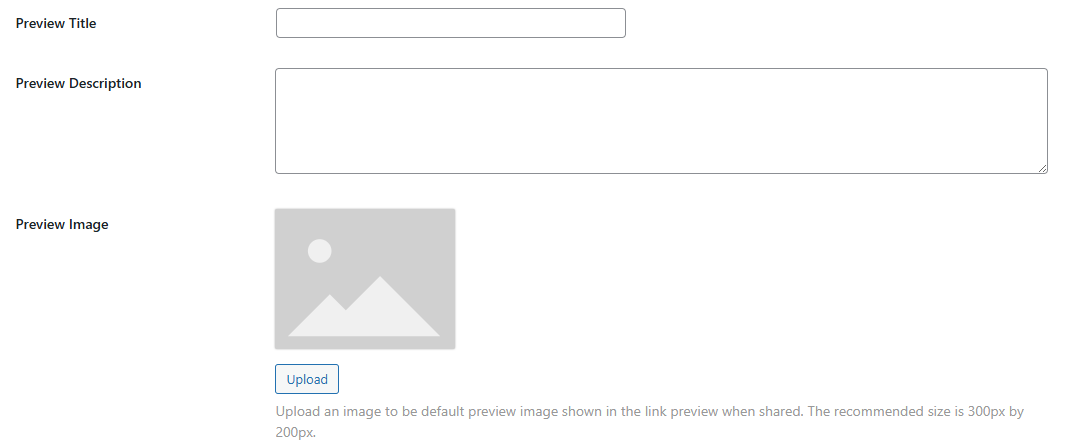
Screenshot of preview image for share app feature

Enable Platforms & Add Fallback #

  1. Check Enable on iOS for Apple sharing support.
  2. Check Enable on Android for Google Play sharing.
  3. In Fallback Link, paste a backup URL (e.g., your website) for desktop or unsupported devices.
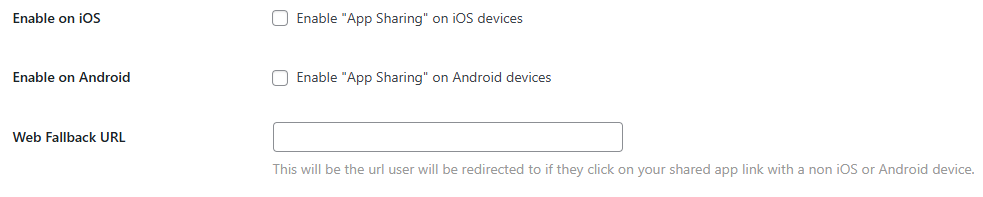
Screenshot of fallback URL

Retrieve the App Share URL #

  • At the top of the Share App Link settings, copy the App Sharing Link.
  • Use it on your site’s buttons, Quick Links, or navigation menus.

Share the App from the Mobile App #

  1. Open the Learndash App on your mobile device.
  2. Go to More > Settings > Share this App.
  3. Tap it to open the share modal.
  4. Select a channel (e.g., Contacts, Facebook, LinkedIn) to send your app link.

Troubleshooting & FAQs #

Q: Why isn’t the “Share this App” option showing in the app?
A: Confirm that App Sharing is enabled, save settings, clear cache, and restart the app.

Q: Why isn’t my preview image appearing when shared?
A: Check that the image is PNG or JPG, sized correctly (1200×628 px), and saved properly.

Updated on April 22, 2026
Table of Contents
  • Introduction
  • Configure the Share App Link Feature
    • Enable App Sharing
    • Customize Preview Content
    • Enable Platforms & Add Fallback
    • Retrieve the App Share URL
  • Share the App from the Mobile App
  • Troubleshooting & FAQs

Was this Doc Useful?

Thanks for your feedback!

Products

  • LearnDash LMS Plugin
  • MemberDash Plugin
  • LearnDash Cloud
  • ProPanel
  • Groups Management
  • Gradebook
  • Notes
  • Integrations

Support

  • Contact Us
  • Experts
  • Documentation
  • Facebook Community

Company

  • About LearnDash
  • Brand Assets
  • Careers
  • Affiliates
  • Privacy Policy
  • Terms and Conditions
  • Refund Policy

Our Partners

  • The Events Calendar
  • MemberDash
  • Kadence
  • GiveWP
  • Iconic
  • SolidWP

Stay Connected Subscribe to our newsletter
  • YouTube
  • X
  • Facebook
  • Instagram

Copyright 2026. All Rights Reserved.

A Liquid Web Brand
WordPress Hosting Services
© 2026 All Rights Reserved

StellarWP
liquidweb