Skip to content
LearnDash Support
  • Products

      LearnDash LMS Plugin

      Powering intuitive online courses with advanced management and engagement features for WordPress.

      Learn More

      LearnDash LMS Plugin + Hosting

      StellarSites Learning is a fully managed hosting solution for WordPress.

      Learn More

      Premium LMS Add-ons
      Enhance your courses with extra features. Gather insights, reward learners, protect your course content, and more!

      Explore all Add-ons

      MemberDash
      The most flexible membership plugin for WordPress. Monetize your content and build a community.

      View MemberDash

  • Pricing
  • Add-ons & Integrations

      LEARNDASH ADD-ONS

      Instructor Role

      Empower Instructor to manage courses.

      Groups Management

      Organization management, delegation and more

      ProPanel

      Advanced analytics reporting.

      Gradebook

      Track progress and create report cards.

      Notes

      Enable notetaking and two-way communication.

      Rating, Reviews, & Feedback

      Build trust and gain valuable insights.

      FEATURED INTEGRATIONS

      The Events Calendar

      Connect with the most popular events solution.

      BuddyBoss

      Powerful tools for an enhance learning experience.

      WooCommerce

      The most popular shopping cart on WordPress.

      WeGlot

      Translate your LearnDash content.

      All Integrations

      BUNDLES

      Package and save
      Save when you buy multiple plugins in a bundle.

      See all bundles.

      MORE

      Release Notes

      Get Help

  • Resources
      LearnDash Academy Videos, webinars, and resources to help you launch a successful course.
      Blog Blog
articles with the latest news and tips to help you run high-quality courses.
      Knowledge Base A support network to help you make the most of your courses.
      Release Notes Stay up-to-date with the latest updates to LearnDash.
      Get Help

      Professional Services

      LMS Site Development Get hands-on assistance launching your course website.
      Website Maintenance WordPress management made easy.
      SEO Services SEO solutions that accelerate growth.

      Other Resources

      LearnDash Accessibility At LearnDash, we believe online learning should be accessible to everyone.
      Join the Dev Club
  • Demo
  • Sign In
Get LearnDash

Knowledge Bases: Support Home | LearnDash Core | LearnDash Add-ons | LearnDash Cloud | Resources | Mobile App

LearnDash Support
  • ← Return to LearnDash
  • Support
    • Support Home
    • All Knowledge Bases
    • LearnDash Core
    • Add-ons
    • Resources
    • Cloud
  • My Account
Popular searches: api duplicate couse email gp query loop [ld_course_resume]

ProPanel

1
  • ProPanel

Getting Started with LearnDash Cloud

9
  • LearnDash LMS for the Cloud
  • LearnDash Cloud
  • How to Back Up Your Site
  • How to Get Support in LearnDash Cloud
  • Setting Up Your DNS to Use Your Own Domain Name
  • How to Connect a Domain
  • Logging In to Your LearnDash Cloud Site
  • Using the Go Live Widget
  • LearnDash Cloud Video Management Best Practices

Account & Billing

6
  • Edit Your Customer Account Email and Password
  • License
  • Updates
  • How To Get Help
  • Billing
  • LearnDash Licensing & Management

Troubleshooting

2
  • Troubleshooting Basics
  • Why is the registration form not showing?

User Guides

10
  • How do I remove the ‘Take This Course’ button?
  • Gamification And Badges In LearnDash
  • How do I hide post meta data (date, author, comments, etc.)?
  • Translation
  • Transferring LearnDash Courses
  • How do I protect my course files & downloads?
  • User Guides
  • LearnDash Migration
  • How to Install and Activate LearnDash Add-ons
  • Trusted Login

FAQs

31
  • Can I hide the course content table on the course page?
  • Can I create a unique sidebar for courses, lessons & quizzes?
  • Can I rename “courses,” “lessons,” “topics,” and “quizzes”?
  • Can I reuse lessons & topics across multiple courses?
  • Is LearnDash compatible with other plugins?
  • How do I find the course ID?
  • 404 Errors on LearnDash Pages
  • What kind of media can be used in LearnDash courses?
  • Does LearnDash support Learning Tools Interoperability (LTI)?
  • How do I automatically assign users to courses when they sign up/register on my site?
  • How can I make email notifications send on time?
  • I’m getting the error “the link you followed has expired” when installing LearnDash.
  • Questions about MemberDash?
  • Known Issues & Conflicts
  • Why is the registration form not showing?
  • Page Builders + LearnDash
  • Why are the license updates and license checks disabled?
  • FAQs
  • Your Add-Ons and Plugins are Officially Migrating to LearnDash FAQs
  • WisdmLabs Acquisition FAQ
  • How to Manually Install and Update Plugins from WordPress.org
  • What is the best way for me to bundle courses using LearnDash?
  • What plugins can be used with LearnDash for math equation editing?
  • Do I need a plugin to do drip feeding?
  • Can I use the same Stripe Purchase Button on multiple courses?
  • Is there a shortcode for displaying a single lesson in LearnDash?
  • Is there a way to export an individual course?
  • What should I do if my course content is not displaying correctly?
  • Moving Away from LearnDash Cloud
  • What steps can I take if a lesson or topic is not marked as complete?
  • What are the different user roles in LearnDash and what permissions do they have?

Getting Started with LearnDash

13
  • Setting Up Your First Course with LearnDash
  • Getting Started
  • LearnDash Overview
  • Technical Requirements
  • The Onboarding Wizard
  • Installation
  • LearnDash Core
  • Orders
  • Shortcodes and Blocks
  • Coupons
  • How to Use the Design Wizard
  • The Design Wizard
  • Style Customizer

Courses

14
  • Course Grid
  • Course Enrollment Mode Settings
  • Course Builder
  • Courses
  • Shared Course Steps
  • Course Display & Content Settings
  • Course Sections
  • Course Progression
  • Course Page
  • Course Create Wizard
  • Course Outline Builder
  • Pre-Selling
  • Course Dashboard
  • Course Completion Page

Lessons

9
  • Video Progression
  • Global Lesson Settings
  • Lesson Access Settings
  • Lessons
  • Lesson Display and Content Settings
  • Lesson Page Content
  • Sample (Free) Lessons
  • Lesson Access Settings
  • Blended Learning

Topics

5
  • Topics
  • Global Topic Settings
  • Topic Display and Content Settings
  • Topic Page Content
  • Topic Display & Content Settings

Quizzes

12
  • XML Quiz Import/Export Guide
  • Global Quiz Settings
  • Quiz Builder
  • Quizzes
  • Quiz Display & Content Settings
  • Quiz Results Display
  • Quiz Custom Fields
  • Quiz Leaderboard
  • Quiz Email Notifications
  • Manage & Grade Essays
  • Quiz AI Builder
  • Quiz Access & Progression

Questions

1
  • Quiz Questions

Certificates

3
  • Certificates
  • Create a Certificate
  • Certificate Shortcodes

Groups

11
  • Group Administration
  • User Groups
  • Global Group Settings
  • Group Page
  • Group Display and Content Settings
  • Group Access Settings
  • Group Courses
  • Group Users and Group Leaders
  • Publishing and Viewing a Group
  • Group Leader Capabilities
  • Group Cohorts

Challenge Exams

1
  • Challenge Exams

Virtual Instructors

1
  • Intro to Virtual Instructors

Assignments

4
  • Assignments
  • Global Assignment Settings
  • Manage Assignments
  • Enable Assignments

Reports

3
  • SCORM and xAPI
  • Reporting
  • How to disable core reports

Instructor Role

34
  • Intro to Instructor Role
  • Instructor Overview Page
  • Instructor Dashboard
  • Instructor Dashboard Menu
  • Adding Instructors
  • Multiple Instructors
  • Instructor Commissions
  • Selling Courses Through WooCommerce
  • Instructor Profile
  • Profile Introduction Sections
  • Create Learning Content And Quizzes
  • Instructor Role Reports
  • Instructor Notifications
  • Instructor Role Email Settings
  • Review Instructor Course Updates
  • Instructor Groups Access
  • Instructor Comments Access
  • Student Teacher Communication
  • Multiple Instructors Shortcode
  • Instructor Dashboard Settings
  • Instructor Role Color Schemes
  • Commission Logs
  • Instructor Role Navigation Settings
  • Instructor Role Overview Settings
  • Instructor Role Menu Settings
  • Frontend Course Creator
  • Frontend Quiz Creator
  • Frontend Dashboard: Installation Guide
  • Frontend Dashboard for Instructors: Gutenberg Blocks List
  • How to Customize the Frontend Dashboard
  • How to disable the WordPress admin page for Instructors
  • Introducing Frontend Dashboard
  • Elementor Compatibility
  • Setup PayPal Payouts for Instructors

Settings

15
  • Custom Labels
  • PayPal Checkout
  • Global Course Settings
  • Login and Registration
  • Settings
  • Permalinks (URLs)
  • General Settings
  • Focus Mode
  • Payments
  • Advanced Options
  • Emails – LearnDash General Settings for Notifications and Senders
  • Razorpay Integration
  • Cloning
  • Experiments
  • Payments
    • PayPal Checkout

Ratings, Reviews, & Feedback

1
  • Ratings, Reviews, & Feedback

Elementor Add-on

1
  • LearnDash Elementor Addon

Groups Plus

6
  • Group Leader
  • Create an Organization
  • Getting Started with Groups Plus
  • WooCommerce LearnDash Teams Products
  • Front-end Dashboard
  • Groups Plus FAQ

2Checkout Add-on

1
  • 2Checkout Integration

bbPress Add-on

1
  • bbPress Integration

Easy Digital Downloads Add-on

1
  • Easy Digital Downloads Integration

Event Espresso Add-on

1
  • Event Espresso Integration

Gravity Forms Add-on

1
  • Gravity Forms Integration

MemberPress Add-on

1
  • MemberPress Integration

Notifications Add-on

1
  • Notifications Add-On

Paid Memberships Pro Add-on

1
  • Paid Memberships Pro Integration

Restrict Content Pro Add-on

1
  • Restrict Content Pro Integration

SamCart Add-on

1
  • SamCart Integration

Stripe Add-on

2
  • Stripe Connect
  • Stripe Add-on Deprecation FAQ

The Events Calendar Add-on

1
  • The Events Calendar Integration

ThriveCart Add-on

1
  • ThriveCart Integration

WooCommerce Add-on

1
  • WooCommerce Integration

Zapier Add-on

1
  • Zapier Integration

Compatibility Add-on

1
  • Compatibility Add-Ons

Certificate Builder Add-on

1
  • Certificate Builder Add-On

Achievements Add-on

1
  • Achievements Add-On

Integrity Add-on

1
  • Integrity Add-on

3rd Party Plugins

1
  • 3rd Party Plugins

Gradebook

1
  • Gradebook Add-On

Notes Add-on

1
  • Notes Add-On

Users

5
  • Users and Groups
  • User Data
  • User Management
  • User Profiles
  • Extend Access

Developers

3
  • Adding Fields to LearnDash Registration Forms with Advanced Custom Fields (ACF)
  • Developers
  • Protecting Files

Design

1
  • Widgets

Groups Management

4
  • Groups Management
  • Global Settings
  • Groups Plus Add-On
  • Group Registration for LearnDash

Getting Started with the LearnDash App

11
  • How to Configure Access Groups in Your Learndash App
  • How to Set Up Your Apple Developer Account for your Learndash App
  • How to Create Your Google Play Developer Account for your Learndash App
  • How to Connect Your Google Developer Account to the Learndash App
  • How to Connect Your Apple Developer Account to your Learndash App
  • How to Configure your Learndash Android App Links
  • How to Configure Your iOS Learndash App
  • How to Configure Your Android Learndash App
  • How to Configure Google Firebase for Your LearnDash App
  • How to Configure Apple Universal Links for your Learndash App
  • Hosting Recommendations for the LearnDash App

Managing Your LearnDash App

8
  • How to Configure API CDN
  • How to Set Up a Private LearnDash App
  • How to Configure the Delete Account Settings
  • How to Enable the “Rate This App” Feature in the LearnDash App
  • How to Enable and Use the Report a Bug Feature in the LearnDash App
  • How to Enable “Send Us Feedback” in the LearnDash App
  • How to Configure the Smart Banner in the LearnDash App
  • How to Configure External Link Handling in the LearnDash App

Going Live

7
  • How to Use the Learndash App Publishing Service
  • How to Update Your Android Learndash App
  • How to Publish Your LearnDash App to the Apple App Store
  • How to Publish Your Android LearnDash App to the Google Play Store
  • How to Publish an Unlisted Learndash App to the Apple App Store
  • How to Configure Google Play Store Closed Testing
  • Apple App Store Publishing Checklist – How to Prepare Your iOS Learndash App for Publishing on the Apple App Store

Advanced for the Learndash App

7
  • How to Configure Access Rules in Your Learndash App
  • How to Configure the Default Restricted Message in Your Learndash App
  • How to Create Multiple Versions of App Menus in Your Learndash App
  • How to Enable Maintenance Mode in Your Learndash App
  • How to Manage Access Controls in Your Learndash App
  • How to Migrate Require Purchase Functionality in Your Learndash App
  • How to Create an APNs Auth Key for Your Learndash iOS App

Managing Content for LearnDash App

17
  • What are the Supported LearnDash App Blocks
  • How to Use Web Fallbacks
  • How to Use the Blog Posts App Block
  • How to Translate Text
  • How to Enable Right-to-Left (RTL) Language Support
  • How to Customize the App Navigation Header
  • How to Configure Your Tab Bar and More Screen
  • How to Configure Your Learndash App Homepage
  • How to Configure Typography
  • How to Configure Tab Bar Visibility
  • How to Configure the Tab Bar Icons
  • How to Configure the Directory Block
  • How to Configure the Learndash App Colors
  • How to Configure Deep Linking
  • How to Configure App Images & Icons
  • How to Add H5P Interactive Content to Your Learndash App
  • How to Add a Blog Page and Posts

App Builds

8
  • How to Upload Learndash App iOS Builds
  • How to Update Your Android Learndash App
  • How to Install iOS Test Builds
  • How to Install Android Test App Builds
  • How to Generate New App Builds
  • How to Generate iOS Release Apps
  • How to Generate Android Release Apps
  • How to Configure General App Settings

In-App Purchases

7
  • How to Test In-App Purchases
  • How to Set Up In-App Purchases
  • How to Set Up Android In-App Purchases
  • How to Select an iOS Review Version for In-App Purchases
  • How to Require In-App Purchases During Registration
  • How to Configure Subscription Groups
  • How to Configure iOS In-App Products

Done For You

13
  • How to Add LearnDash as Admin to Your Apple Developer Account
  • How to Add LearnDash as a User to Your Google Developer Account
  • Add [email protected] to Google Cloud
  • How to Set Up Firebase for Your Learndash App
  • How to Complete Agreements, Tax & Banking in Your Apple Developer Account
  • How to Create Bundle IDs for Your Learndash iOS Apps
  • How to Create Your Google Play Developer Service Account Key for Your Learndash App
  • How to Create Your Learndash App Listing in Google Play Console
  • How to Generate and Connect Your Apple Developer API Key to Your Learndash App
  • How to Set Up Firebase
  • How to Create Your Google Play Developer Service Account Key
  • How to Create an APNs Auth Key for Your Learndash iOS App
  • How to Add the Learndash Team as Owner to Your Firebase Project

Getting Started with LearnDash MCP Server

8
  • LearnDash MCP FAQ
  • Troubleshooting Common MCP Errors
  • LearnDash AI Prompt Library
  • Prompting AI Agents for LearnDash
  • How to Use Cursor with LearnDash
  • LearnDash + Angie
  • Creating WordPress Application Passwords for MCP
  • Getting Started with the LearnDash Model Context Protocol (MCP)
View Categories
  • Home
  • All Knowledge Bases
  • User Groups

User Groups

LearnDash Groups give you the ability to group certain users together and assign a Group Leader who can track the progress and performance of any user in their group. Groups can have any number of courses associated with them, and anyone in that group will be automatically enrolled into the course(s).

Creating a Group #

  1. Navigate to LEARNDASH LMS > GROUPS
  2. Click Add New
  3. Give the group a title

(Optional) Give the group a description

NOTE: Group description and Course Materials will be publicly visible by default. If you wish to set those to “group enrollees only” you must include the content within student shortcodes.

Group title menu

Adding Courses to a Group #

Once you have created a group, you can now assign courses to it. When a course is assigned to a group, any user who is in the group will automatically get enrolled into that course. There are no limits on the number of courses that can be associated with a group. Courses can also be associated with multiple groups.

  1. Start from the Edit Group page
  2. Select the Courses tab
  3. Add any desired courses from right-side Group Courses section onto the left-side box.
  4. To do this, choose the course(s) you want to add to the group by clicking on the course title. Hold CTRL (CMD on Mac) to select multiple courses at once.
  5. Click the right arrow to move the course(s) into the Assigned Group Courses window
  6. If you want users to be automatically added to a group upon ANY assigned course enrollment, select the Enable automatic group enrollment when a user enrolls into any associated group course checkbox. Alternatively, you can specify which course enrollment should grant automatic group enrollment by leaving the option unchecked and adding courses into the right-side box.

NOTE: This is a particularly useful setting if you are selling courses with a shopping cart like WooCommerce and want users to be automatically added to a group after purchase.

Courses in groups

Assigning a Group Leader #

After you have added courses to the group, you must select a Group Leader. There are no limits on the number of Group Leaders that can be assigned to a group, but it must have at least one.

Assigning a Group Leader to a group is the same process as when you assigned courses.

  1. Starting from the Edit Group page
  2. Scroll down to Group Leaders
  3. Choose on the user(s) you want to add as Group Leaders by clicking on their name. Hold CTRL (CMD on Mac) to select multiple courses at once.
  4. Click the right arrow to move the user into the Assigned Group Leaders window
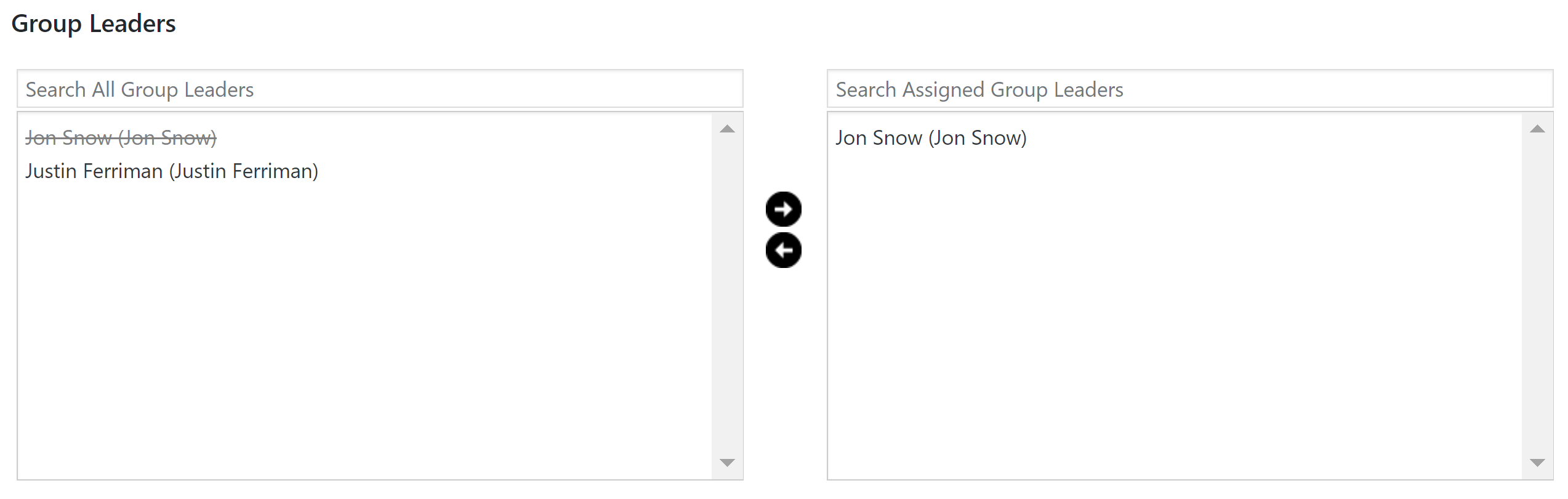
Sample of Group Leaders

About the Group Leader User Role #

Group Leader is a user role included in LearnDash. It adds the ability to:

  • view reports on course progress for any user in the group
  • view reports on quiz performance for any user in the group
  • send email messages to the entire group

NOTE: If you would like the Group Leader to have even more abilities, you can use the User Role Editor plugin to modify their permissions and capabilities.

Creating a Group Leader #

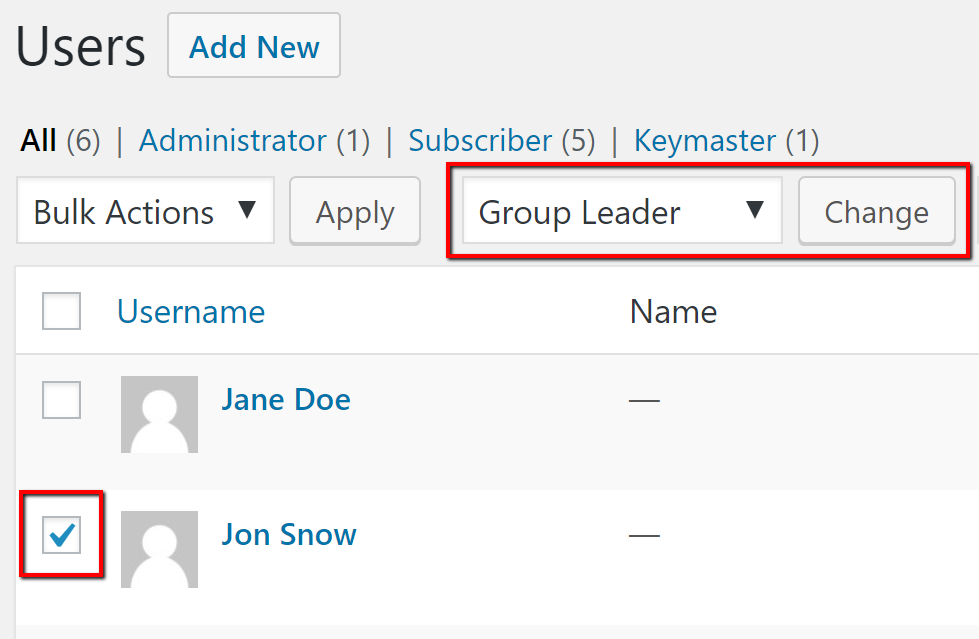
Before you can assign a Group Leader, you have to grant the Group Leader user role to the desired users. After doing so, they will appear for selection when you create your group.

  1. From your WordPress admin dashboard, navigate to USERS > ALL USERS
  2. Select the checkbox next to the desired user(s)
  3. From the Change role to… dropdown menu, select Group Leader
  4. Click Change
Users display

Adding Users to the Group #

Adding users to your group is similar to how you added courses and Group Leaders.

  1. Still on the Edit Group page…
  2. Scroll down to Group Users
  3. Choose the user(s) you want to add to the group by clicking on their name. Hold CTRL (CMD on Mac) to select multiple courses at once.
  4. Click the right arrow to move the user into the Assigned Group Users window
Sample of Group Users

Publishing the Group #

When you are ready for the group to be created, simply click the Publish button. Once the group is published, users of the group get enrolled into any course associated to that group. If you do not want users to get access to the courses, then click the Save Draft button instead.

Groups Use-Cases #

  • You are a teacher and you want to divide up students into classes so that you can track them independently from one another
  • Your organization requires certain roles to receive specific training/courses
  • You want to sell course licenses to organizations so they can purchase access for a group of their employees (requires a 3rd party add-on)
  • Your course doesn’t start until a specific date and you want to grant access to all users at the same time
  • You want to drip-feed lessons to users on the same schedule
  • Your organization has multiple locations and you want to track progress & performance by location
Updated on December 11, 2024
Table of Contents
  • Creating a Group
  • Adding Courses to a Group
  • Assigning a Group Leader
    • About the Group Leader User Role
    • Creating a Group Leader
  • Adding Users to the Group
  • Publishing the Group
  • Groups Use-Cases

Was this Doc Useful?

Thanks for your feedback!

Products

  • LearnDash LMS Plugin
  • MemberDash Plugin
  • LearnDash Cloud
  • ProPanel
  • Groups Management
  • Gradebook
  • Notes
  • Integrations

Support

  • Contact Us
  • Experts
  • Documentation
  • Facebook Community

Company

  • About LearnDash
  • Brand Assets
  • Careers
  • Affiliates
  • Privacy Policy
  • Terms and Conditions
  • Refund Policy

Our Partners

  • The Events Calendar
  • MemberDash
  • Kadence
  • GiveWP
  • Iconic
  • SolidWP

Stay Connected Subscribe to our newsletter
  • YouTube
  • X
  • Facebook
  • Instagram

Copyright 2026. All Rights Reserved.

A Liquid Web Brand
WordPress Hosting Services
© 2026 All Rights Reserved

StellarWP
liquidweb