Skip to content
LearnDash Support
  • Products

      LearnDash LMS Plugin

      Powering intuitive online courses with advanced management and engagement features for WordPress.

      Learn More

      LearnDash LMS Plugin + Hosting

      StellarSites Learning is a fully managed hosting solution for WordPress.

      Learn More

      Premium LMS Add-ons
      Enhance your courses with extra features. Gather insights, reward learners, protect your course content, and more!

      Explore all Add-ons

      MemberDash
      The most flexible membership plugin for WordPress. Monetize your content and build a community.

      View MemberDash

  • Pricing
  • Add-ons & Integrations

      LEARNDASH ADD-ONS

      Instructor Role

      Empower Instructor to manage courses.

      Groups Management

      Organization management, delegation and more

      ProPanel

      Advanced analytics reporting.

      Gradebook

      Track progress and create report cards.

      Notes

      Enable notetaking and two-way communication.

      Rating, Reviews, & Feedback

      Build trust and gain valuable insights.

      FEATURED INTEGRATIONS

      The Events Calendar

      Connect with the most popular events solution.

      BuddyBoss

      Powerful tools for an enhance learning experience.

      WooCommerce

      The most popular shopping cart on WordPress.

      WeGlot

      Translate your LearnDash content.

      All Integrations

      BUNDLES

      Package and save
      Save when you buy multiple plugins in a bundle.

      See all bundles.

      MORE

      Release Notes

      Get Help

  • Resources
      LearnDash Academy Videos, webinars, and resources to help you launch a successful course.
      Blog Blog
articles with the latest news and tips to help you run high-quality courses.
      Knowledge Base A support network to help you make the most of your courses.
      Release Notes Stay up-to-date with the latest updates to LearnDash.
      Get Help

      Professional Services

      LMS Site Development Get hands-on assistance launching your course website.
      Website Maintenance WordPress management made easy.
      SEO Services SEO solutions that accelerate growth.

      Other Resources

      LearnDash Accessibility At LearnDash, we believe online learning should be accessible to everyone.
      Join the Dev Club
  • Demo
  • Sign In
Get LearnDash

Knowledge Bases: Support Home | LearnDash Core | LearnDash Add-ons | LearnDash Cloud | Resources | Mobile App

LearnDash Support
  • ← Return to LearnDash
  • Support
    • Support Home
    • All Knowledge Bases
    • LearnDash Core
    • Add-ons
    • Resources
    • Cloud
  • My Account
Popular searches: api duplicate couse email gp query loop [ld_course_resume]

Managing Your LearnDash App

6
  • How to Set Up a Private LearnDash App
  • How to Enable the “Rate This App” Feature in the LearnDash App
  • How to Enable and Use the Report a Bug Feature in the LearnDash App
  • How to Enable “Send Us Feedback” in the LearnDash App
  • How to Configure the Smart Banner in the LearnDash App
  • How to Configure External Link Handling in the LearnDash App

Going Live

3
  • How to Update Your Android Learndash App
  • How to Publish Your Android LearnDash App to the Google Play Store
  • Apple App Store Publishing Checklist – How to Prepare Your iOS Learndash App for Publishing on the Apple App Store

Managing Content for LearnDash App

1
  • How to Configure Your Tab Bar and More Screen

Done For You

2
  • How to Add LearnDash as a User to Your Google Developer Account
  • How to Generate and Connect Your Apple Developer API Key to Your Learndash App
View Categories
  • Home
  • All Knowledge Bases
  • LearnDash App
  • How to Configure Apple Universal Links for your Learndash App

How to Configure Apple Universal Links for your Learndash App

Introduction #

Apple Universal Links let your website URLs open directly in the Learndash App on iOS, eliminating Safari redirects and creating a seamless experience. This guide walks you through enabling Associated Domains in your Apple Developer account, regenerating provisioning profiles, configuring Universal Links in the Learndash App plugin, and verifying your setup.

Enabling Associated Domains #

  1. Log in to your Apple Developer account at appleid.apple.com, then open Certificates, Identifiers & Profiles.
  2. Select Identifiers, click your App ID.
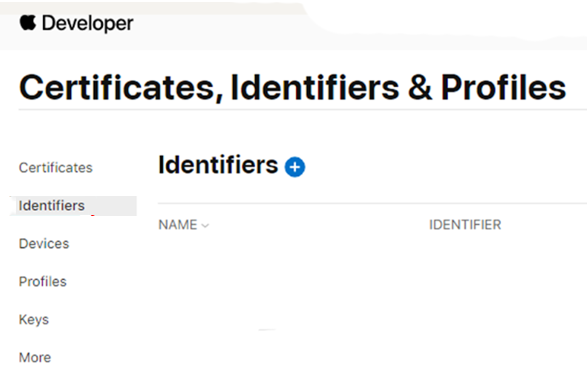
Screenshot of Certificates, Identifiers, and Profiles
  1. Go to the Capabilities tab.
  2. Check Associated Domains and click Save.

Note: After toggling this capability, you must regenerate your provisioning profiles.

Regenerating Provisioning Profiles #

  1. In WordPress, go to Learndash App > Configure > iOS Settings and find Provisioning Profiles.
  2. Uncheck Automatically generate provisioning profiles and click Save Changes.

Screenshot of provisioning profiles
  1. Click the X next to each existing profile to delete it, then click Save Changes again.
  2. Re-enable Automatically generate provisioning profiles and click Save Changes to create fresh profiles.

Activating Universal Links #

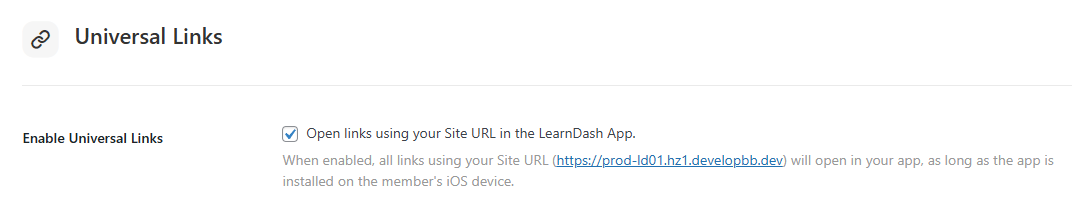
  1. Navigate to Learndash App > Configure > iOS Settings > Universal Links.
  2. Check Enable Universal Links.
Screenshot of Universal Links
  1. (Optional) In Excluded Links, list any URL patterns you don’t want to open in the app.
  2. Click Save Changes.

Note: You must request a new iOS build whenever you enable or disable Universal Links.

Verifying Your Association File #

Open your browser and visit:

https://<your-site-url>/.well-known/apple-app-site-association

You should see a valid JSON response containing your app identifiers and supported paths.

Troubleshooting and FAQs #

Q: My build fails after enabling Associated Domains, what should I check?
A: Ensure you deleted and regenerated your provisioning profiles, then rebuild and upload the new IPA.

Q: Universal Links aren’t opening the app, why?
A: Verify your apple-app-site-association file is served over HTTPS without redirects and contains the correct appID and paths arrays.

Q: How do I exclude certain URLs from Universal Links?
A: Add them to the Excluded Paths field under Universal Links in your Learndash App settings, then save and rebuild.

Q: I get a 404 when fetching the association file, what’s wrong?
A: Make sure your server allows access to /.well-known/ and that the apple-app-site-association file resides at /.well-known/apple-app-site-association.

Q: Will disabling Universal Links break existing deep links?
A: Yes, URLs will revert to opening in Safari. Re-enable Universal Links in settings and request a new build to restore in-app behavior.

Updated on April 22, 2026
Table of Contents
  • Introduction
  • Enabling Associated Domains
  • Regenerating Provisioning Profiles
  • Activating Universal Links
  • Verifying Your Association File
  • Troubleshooting and FAQs

Was this Doc Useful?

Thanks for your feedback!

Products

  • LearnDash LMS Plugin
  • MemberDash Plugin
  • LearnDash Cloud
  • ProPanel
  • Groups Management
  • Gradebook
  • Notes
  • Integrations

Support

  • Contact Us
  • Experts
  • Documentation
  • Facebook Community

Company

  • About LearnDash
  • Brand Assets
  • Careers
  • Affiliates
  • Privacy Policy
  • Terms and Conditions
  • Refund Policy

Our Partners

  • The Events Calendar
  • MemberDash
  • Kadence
  • GiveWP
  • Iconic
  • SolidWP

Stay Connected Subscribe to our newsletter
  • YouTube
  • X
  • Facebook
  • Instagram

Copyright 2026. All Rights Reserved.

A Liquid Web Brand
WordPress Hosting Services
© 2026 All Rights Reserved

StellarWP
liquidweb